
Everything in the Fees chapter rests on one idea. Each student has one fees account. Every bill and every payment is a line on it. The lines added up are the student's balance. Read this lesson once; the others assume it.
One account per student#
Every student has a student account. It is made for them when they are admitted, or the first time something is billed or paid for them. You never create one yourself. You find it under Fees & finance › Student accounts, or from the Fees tab of the student's page.
Lines: bills and payments#
Nothing on an account is ever typed over. Everything that happens is a new line, with its date, its term, who entered it (or Automatic, when the system wrote it, as for SchoolPay payments and the term's billing) and what it was for.
| What happened | The line | Its amount |
|---|---|---|
| The term's fees were billed (from the Fee structure) | Fees billing | Minus |
| A service was billed (Services) | Fees bill | Minus |
| A parent paid: cash, bank, SchoolPay, online, the phone app | Fees payment | Plus |
| A bursary was awarded (Bursaries) | A bursary credit | Plus |
| Staff corrected the account (Fixing mistakes) | An adjustment | Plus or minus |
| Last term's balance was carried into the new term | Carried down and brought forward | A pair that cancels out |
A bill is a minus figure because it takes the account down. A payment is a plus figure because it brings it back up.
The balance#
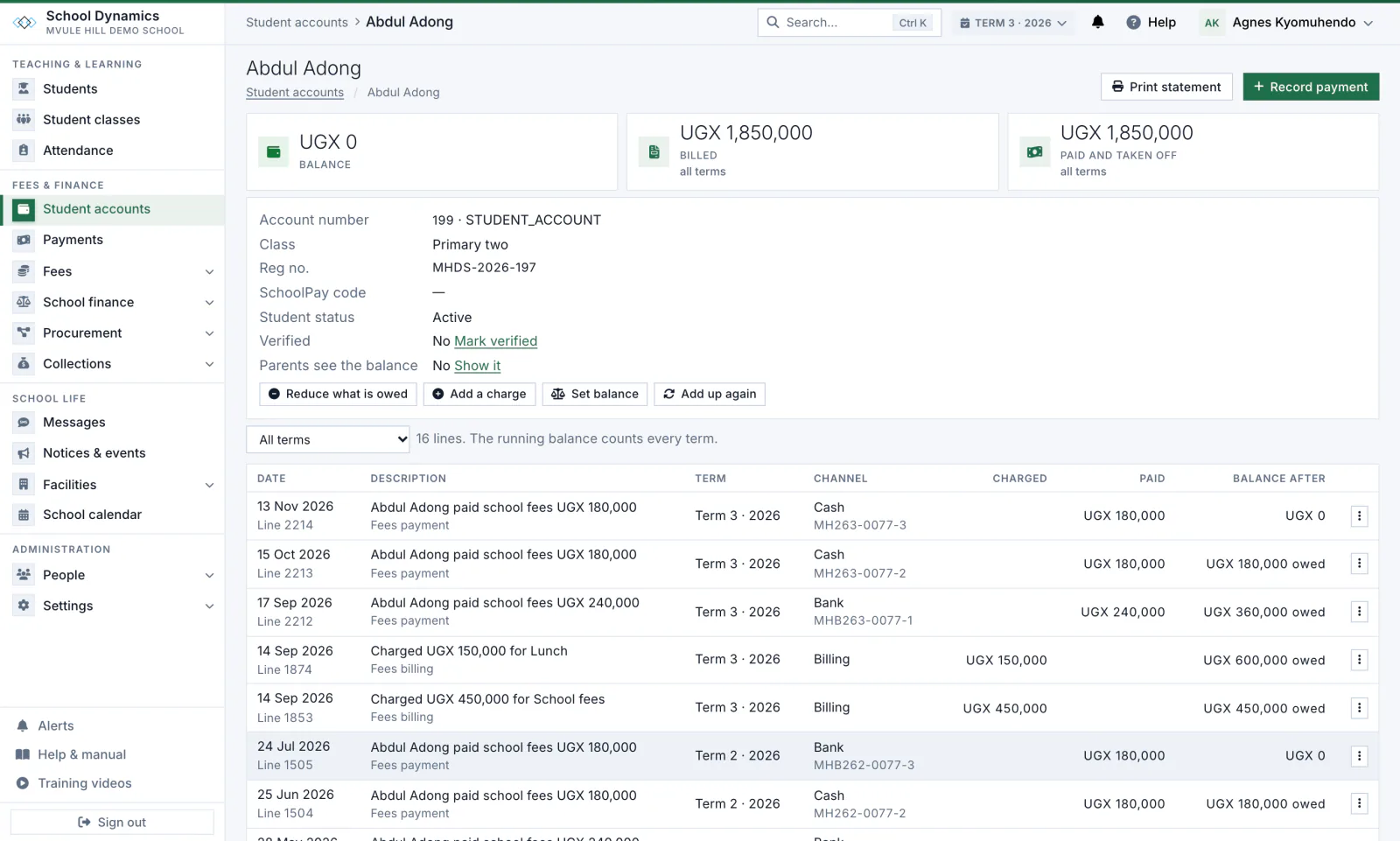
- The balance: what the student owes, or has paid ahead.
- Each line. Bills and charges go in Charged; payments in Paid.
- The balance after each line, counting every term.
- The term each line belongs to.
The balance 1 is every line on the account added up, across every term. It is worked out again after every line is added, changed or removed, so it is always the sum of the lines 2.
- Below zero: the student owes the school. UGX -300,000 means UGX 300,000 owed.
- Zero: cleared.
- Above zero: the student is in credit. They paid more than they were billed, and the extra counts against the next bills.
Most screens say this in words, so nobody has to decode a minus sign: UGX 300,000 owed in red, UGX 20,000 ahead (paid ahead) in green, or Cleared. Receipts say owed, Fully paid or paid ahead. In Set balance you type the figure without a minus sign and choose whether the student owes it or has paid it ahead.
A worked example, for a P.2 pupil in a new term:
| Line | Amount | Balance after it |
|---|---|---|
| School fees billed | UGX -450,000 | UGX -450,000 |
| Lunch billed | UGX -150,000 | UGX -600,000 |
| Cash payment | UGX 300,000 | UGX -300,000 |
| Bank payment | UGX 200,000 | UGX -100,000 |
The pupil owes UGX 100,000. The Balance after column of the statement 3 shows exactly this, as UGX 100,000 owed.
Terms#
Every line belongs to a term 4. A line saved without one goes to the school's active term. The term decides where a line is counted: billed this term and paid this term add up only that term's lines.
The balance is different: it counts every term. What a student owed last term is still in their balance this term, even if nobody carries it forward. Carrying balances forward (from the Fee structure page) only makes the new term open with a balance brought forward, so the term's own figures include the old debt. It never changes the balance.
Pages with term figures start on the active term. The account's quick view and the Fee structure follow the term chosen in the top bar; the Payments page has its own term list. The student's Fees tab always shows the active term.
How fees get billed#
Class fees reach students on their own. They are billed when:
- a fee is saved for the active term (every active student in that class is billed);
- an active student is admitted to a class, or a student becomes active;
- someone presses Bill all classes or Bill this class on the Fee structure page.
Only active students are billed, and each fee only once per student. Pressing a billing button twice cannot bill anyone twice. The details are in Set the fee structure and bill the term.
Where payments come from#
- Recorded by staff: cash, bank, SchoolPay or PegPay, typed in the Record payment dialog. See Record a payment.
- SchoolPay: payments made with the student's SchoolPay code arrive on the account by themselves once the school uses SchoolPay. See SchoolPay.
- Online: parents pay through the school's own Pesapal account. See Online payments.
- The phone app: the bursar can record a payment from the app too. See The phone app.
Wherever it comes from, a payment is one line, and the balance moves at once.
Who can do what#
| Role | Can |
|---|---|
| Bursar | Everything below, and delete a line (it is kept in Deleted payments and charges) |
| Finance officer, school administrator | Record payments, bill fees, correct accounts |
| Head teacher, deputy head teacher | See every fees page, but not record payments or change accounts |
The school's owner can do all of this too, except deleting a line, which needs the Bursar role. Other staff do not see the fees pages, except that the store keeper uses Requirements and the Canteen. Parents see their own child's balance and receipts only if the school shows that account to parents (see Student accounts).
What happens next#
- Every line posted, changed, reversed or deleted is written in the school's activity log.
- When the school switches on the Payment received text, the parent gets an SMS for each payment. Automatic texts are off until the school turns them on: see Automatic messages.
- Read on: Set the fee structure and bill the term, then Record a payment.