
The activity log is the school's record of who changed what in the system: marks, payments, report-card releases, records and settings. It also records who opened a child's sensitive records, such as the sick bay, discipline, the full profile or an export. Read it when a figure changed and you need to know who changed it, and when.
Open it from Settings › Activity log.
Before you start#
- The school administrator, the head teacher, the deputy and the school's owner can read the log.
- No one can change or delete a line from the system.
Reading the log#
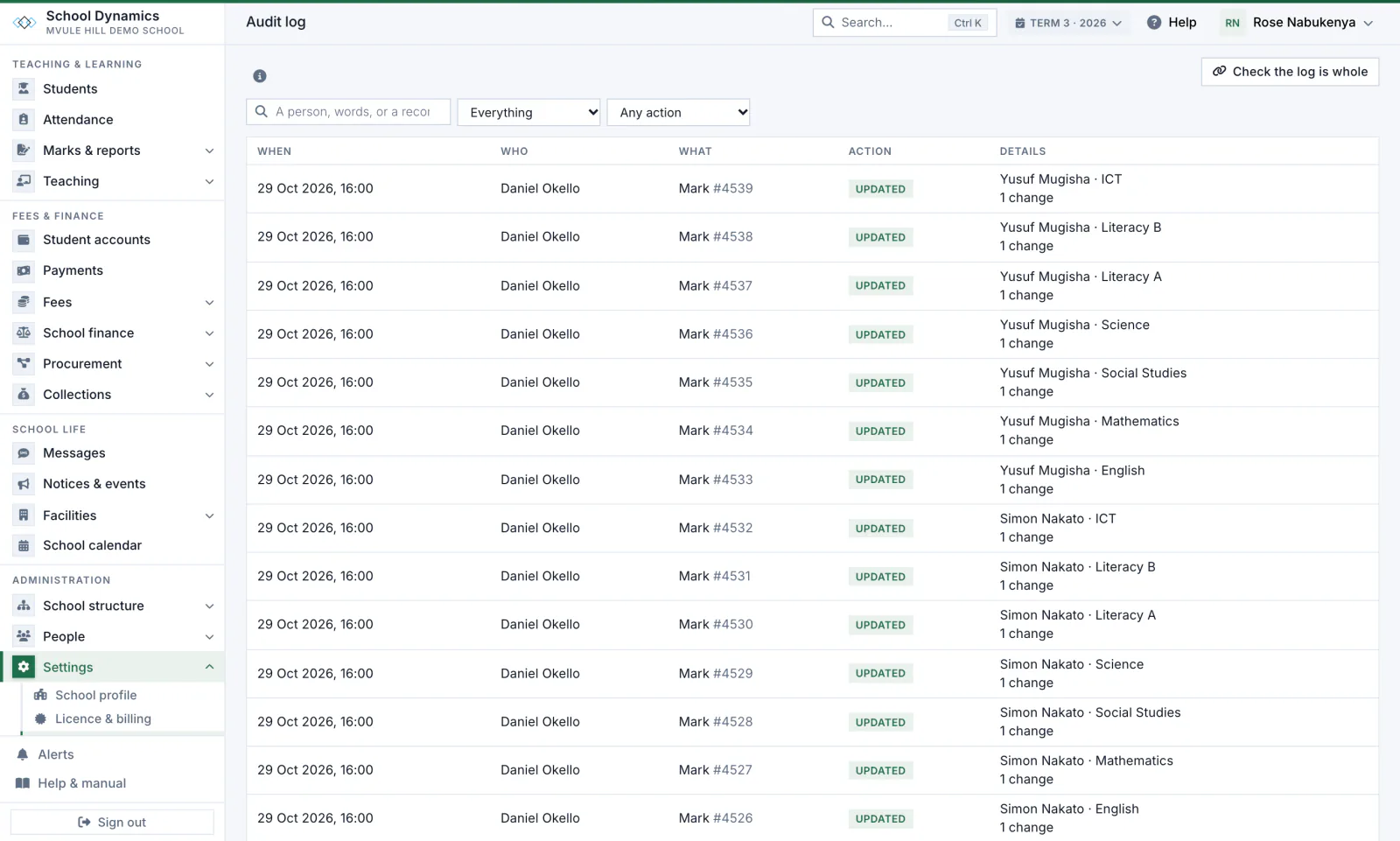
- Check that no line has been edited or removed.
- Search for a person, words, or a record's number.
- Only one kind of record: payments, marks, settings…
- Only one kind of action.
- One line: when, who, which record, what was done, and the details.
The newest line is at the top. Each line 5 says:
- When: the day and time.
- Who: the person, or The system for work School Dynamics did by itself.
- What: the kind of record and its number, for example Transaction number 10234.
- Action: what was done, such as Updated, Viewed or Deleted.
- Details: a sentence about it, the reason when one was given, and, when fields changed, a link such as 3 changes. Click it to see each field, from what to what.
Only the fields that changed are kept, never passwords.
Find something#
- Type in the search box 2: a person's name, words from the details, or a record's number.
- Choose What it is about 3 to see one kind of record only.
- Choose an Action 4 to see one kind of action only.
Check the log is whole#
Each line is chained to the one before it, so a line edited or removed afterwards breaks the chain. Press Check the log is whole 1:
- The log is whole: no line has been edited or removed. All is well.
- The log does not fit together …: a line was edited or removed. Tell School Dynamics support at once.
What is recorded#
Among others:
- changes to the school's settings, and to staff members' roles;
- payments and other fees lines changed, reversed or deleted, and each term's fees billed;
- marks changed, and report cards released;
- parents' consent answers, requests to delete accounts and how they were decided;
- data exports made and downloaded;
- who opened a child's sensitive records.