
The school is in charge of its students', parents' and staff records; School Dynamics keeps them for the school. Uganda's Data Protection and Privacy Act asks the school to agree this with School Dynamics in writing, to tell parents what it records, to ask a parent before a child's photo is used in public, and to keep records no longer than it needs. Data protection holds all of that. Requests to delete an account are under Settings › Account deletions.
Open it from Settings › Data protection.
Before you start#
- The school administrator, the head teacher, the deputy, the secretary and the school's owner can open Data protection and record consent.
- Only the owner and the school administrators can change the privacy contact, open the full agreement and use Keeping records.
- Only the school's owner can accept the agreement.
The school#
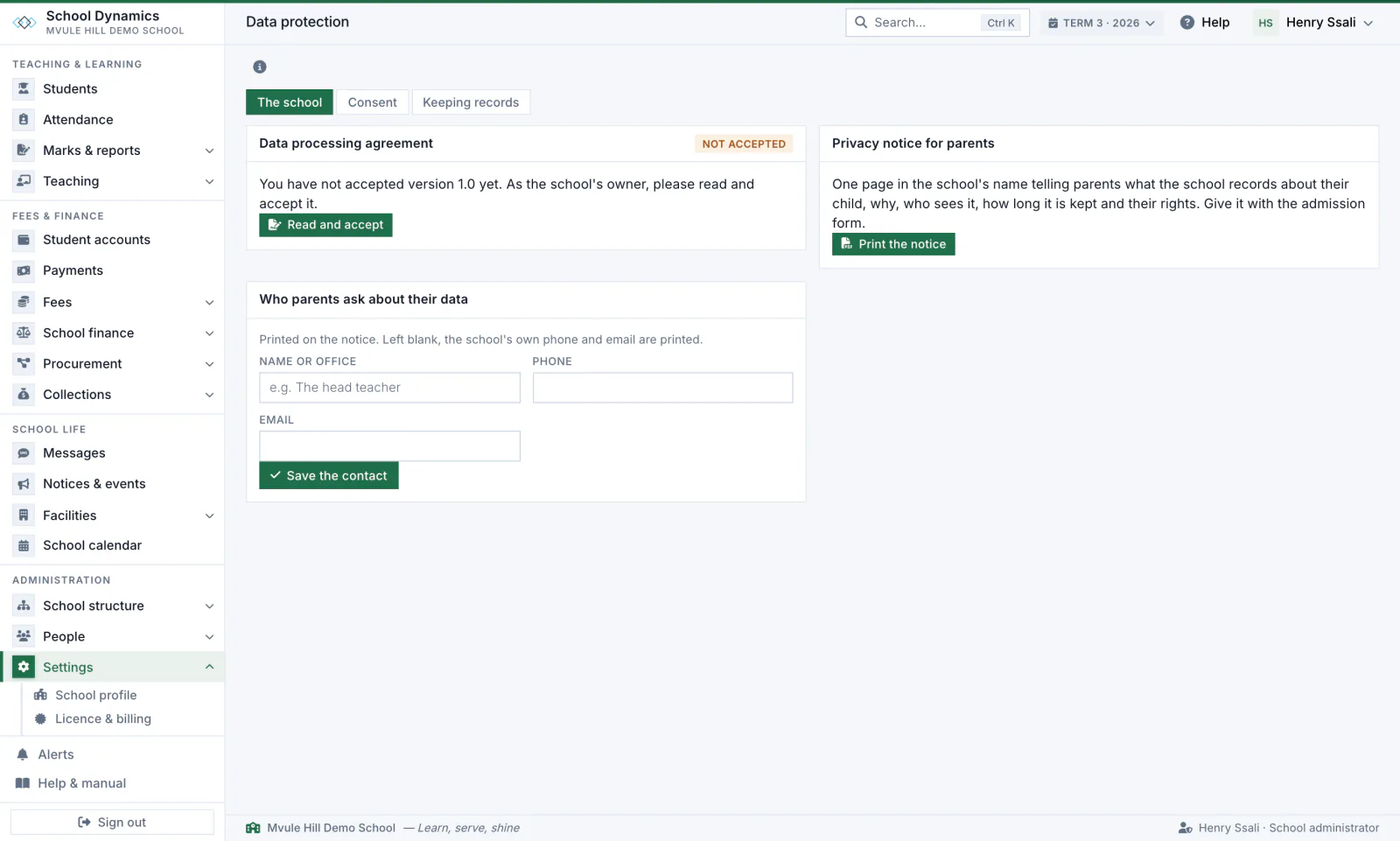
- The school, Consent, and Keeping records (for the owner and school administrators).
- Whether the data processing agreement is accepted.
- The one-page privacy notice for parents, as a PDF.
- Whom parents ask about their data. It is printed on the notice.
The first tab 1 has three boxes.
Data processing agreement. Its badge 2 says whether the agreement is accepted, and the box says by whom and when. While it is not accepted, the owner sees Read and accept: read it, tick I accept this agreement on behalf of … and press Accept the agreement. The owner can put it off for a while with Ask me later; the page says until when. Once accepted, or for anyone else, the button says Read the agreement. On the agreement, Printable copy opens a copy to print.
Privacy notice for parents. One page in the school's name telling parents what the school records about their child, why, who sees it, how long it is kept and their rights. Press Print the notice 3 for the PDF, and give it with the admission form.
Who parents ask about their data. Type a Name or office (The head teacher), a Phone and an Email, and press Save the contact 4. It is printed on the notice. Left blank, the school's own phone and email are printed.
Consent#
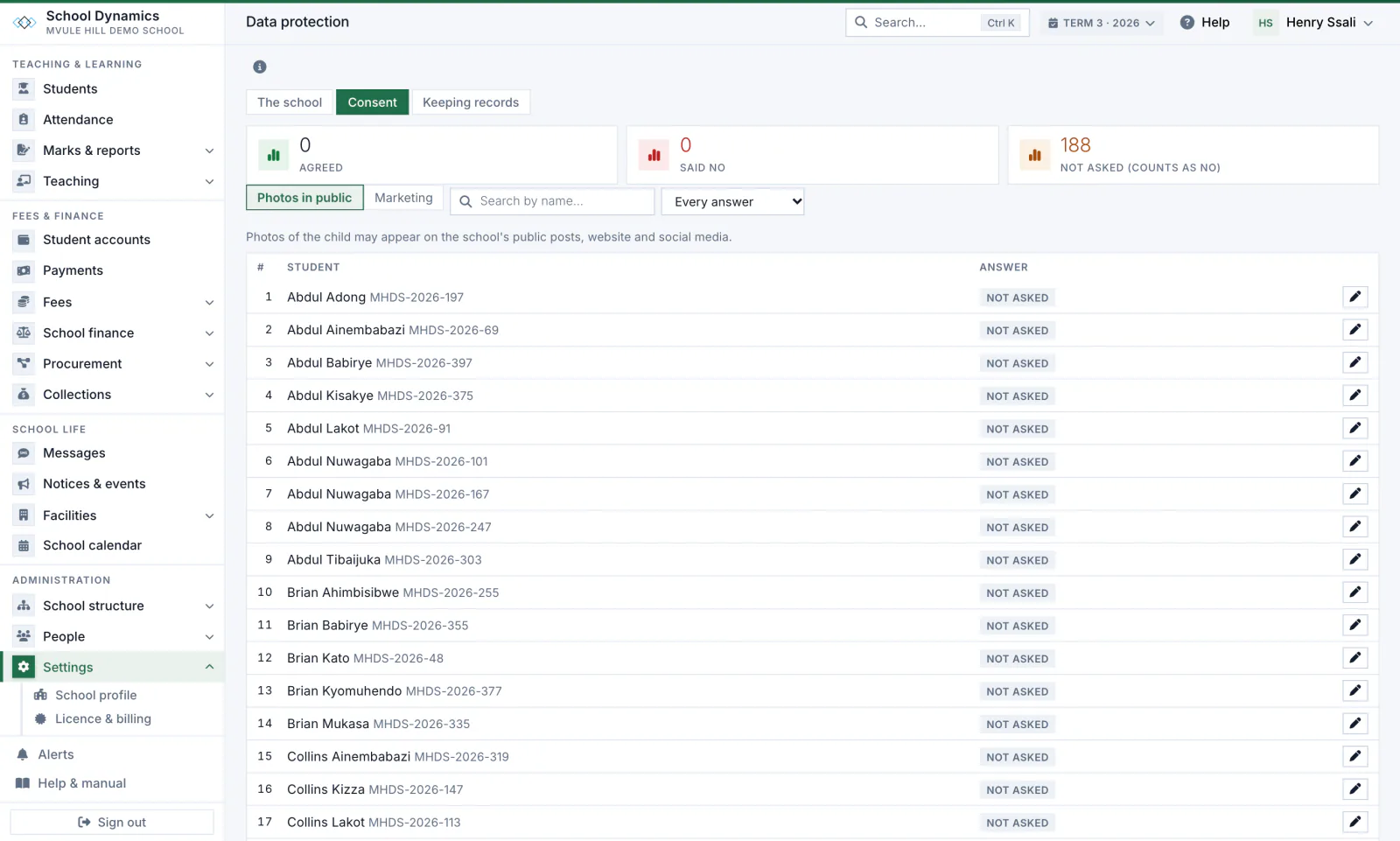
- How many agreed, said no, or were never asked (which counts as no).
- Which consent: photos of the child in public, or marketing to the parent.
- Show only those who agreed, said no or were not asked.
- Record an answer.
The Consent tab records two answers:
| Consent | About | The question |
|---|---|---|
| Photos in public | The child | Photos of the child may appear on the school's public posts, website and social media. |
| Marketing | The parent | The school may send the parent news of its own offers, events and fundraising that are not about the child. |
Choose the consent 2. The figures 1 count who agreed, who said no and who was never asked. No answer counts as no. Search by name, or show one answer only 3.
To record an answer:
- Press the pencil beside the child or parent 4.
- Choose Agreed or Said no.
- Choose How was it given?: the admission or consent form, the parent in person or by phone, or the parent in the app.
- Type Who answered, and when (for example Mother, on the admission form, 12 Oct).
- Press Record the answer.
Every answer is written in the school's activity log.
Keeping records#
This tab is for the owner and school administrators. It sets how long a former student's personal details are kept after they leave.
- Type Years after a student leaves.
- Choose After that: Keep everything (no policy), Report who is past the period, change nothing, or Anonymise them, after I approve each report.
- Press Save the policy. Nothing changes yet.
- Press Make a report now. The report lists every former student past the period, and what would happen to each.
A student counts as having left at the end of the last school year they were in a class. Anyone whose fees account is not settled is kept back, with the reason. Anonymising removes names, dates and places of birth, addresses, phones, email, nationality, religion, parents' and emergency contacts, ID numbers, the SchoolPay code and the photo. The admission number and sex stay, and marks, report cards and the fees ledger stay, linked to Former student #….
The Reports list shows each report with its date, how many are past the period, and its state: To read, Approved, Replaced (a newer report took its place) or how many were anonymised.
Account deletions#
Parents and staff can ask to delete their account, in the phone app or on the website. Their requests wait under Settings › Account deletions for the school to decide.
- The school administrator, the head teacher and the school's owner decide them.
- The list opens on Waiting; Deleted, Declined and All show the others. Each request shows who asked, from where, and their reason.
To decide one:
- Press Decide beside the request.
- Choose Delete the account or Decline.
- To decline, write why; the reason is kept with the request, so the person can be told. To delete, a note is optional.
- Press Delete the account or Decline the request.
Students' records belong to the school, so students cannot ask to delete them here. Every decision is written in the activity log.