
Pocket money is money a family leaves with the school for the student to spend, usually at the canteen. Each student has their own pocket money with a balance and, if you want, a daily limit. It is kept apart from fees: topping it up or spending it never changes the student's fees balance.
Open it from Fees & finance › Pocket money & canteen › Pocket money.
Before you start#
- The bursar, the finance officer and the school administrator can top up, set limits, refund and correct. The head teacher and the deputy can look.
- A student's pocket money opens with its first top-up. Until then, the student is not on the list.
The page#
At the top:
- Held for students: all the pocket money the school holds, and how many students have some.
- Canteen today: what was sold at the canteen today.
- Low balance: how many students have less than UGX 5,000 left.
The list shows each student's Balance (marked Low below UGX 5,000), their Daily limit, and what they Spent today. Search by name or reg no., or tick Low balance only to see who needs topping up.
Top up#
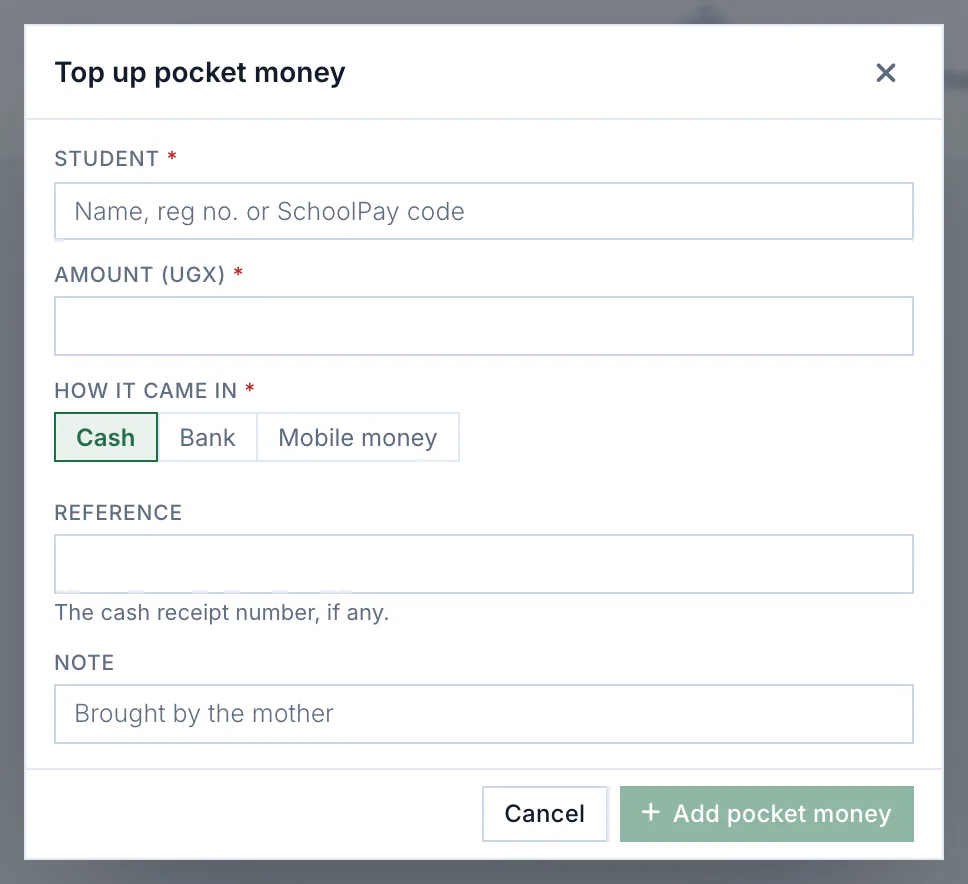
- Find the student by name, reg no. or SchoolPay code
- The amount received
- How the money came in: cash, bank or mobile money
- The bank slip or mobile money number; for cash, the receipt number if any
- Add the money to the student's pocket money
- Press Top up. (Or press the plus icon on a student's row: the dialog opens with that student chosen.)
- Find the student 1: type at least two letters of the name, the reg no. or the SchoolPay code, and choose them.
- Type the Amount (UGX) 2.
- Choose How it came in 3: Cash, Bank or Mobile money.
- Type the Reference 4. For bank and mobile money it is required: the bank slip or the mobile money transaction number.
- Add a Note if it helps, for example Brought by the mother.
- Press the button at the foot 5. It shows the amount, for example Add UGX 20,000.
A message confirms it and gives the new balance. One top-up can be at most UGX 5,000,000.
Look at a student's pocket money#
Click a student's name. The quick view shows:
- the Balance, what was Spent today, and what they Can still spend today;
- the School's daily limit and the Parent's daily limit;
- the Latest movements: top-ups, canteen sales, refunds and corrections, newest first.
Print the whole statement opens a PDF of every movement with the balance after each one.
Set a daily limit#
- In the student's quick view, press Daily limit.
- Type The school's limit a day (UGX), or leave it empty for none.
- Press Set limit.
A limit is between UGX 100 and UGX 1,000,000. The parent can set a lower one from the parents' app; the lower of the two applies. At the canteen, a sale that would go over the day's limit is refused.
Refund a canteen sale#
- In the student's quick view, find the sale under Latest movements.
- Press Refund beside it.
- Check Give back (UGX). It starts at the whole sale; type less to give back part of it.
- Type Why.
- Press Give the money back.
You can give back at most what is left of that sale. A refund made today is taken off what the student spent today, so it also frees room under the daily limit.
Correct a mistake#
If a top-up was typed wrong, correct the balance:
- In the student's quick view, press Correct balance.
- Type the Amount (UGX): a plus amount adds; a minus amount (for example -2000) takes off.
- Type Why.
- Press Save correction.
What happens next#
- Canteen staff charge sales against the balance at the canteen.
- A student whose balance falls below UGX 5,000 shows as Low, here and at the canteen till.