
Finance reports answer the questions a head teacher and a board ask about fees: how much was billed this term, how much came in, through which channel, and who still owes. Each page prints and downloads.
Open them from Fees & finance › School finance › Finance reports. The tabs along the top are Term summary, Report library, Collections, Balances, Income sheets, Demand notices and Promises to pay.
Before you start#
The bursar, the finance officer, the school administrator, the head teacher and the deputy can read every report. Only the first three make or change income sheets.
Term summary#
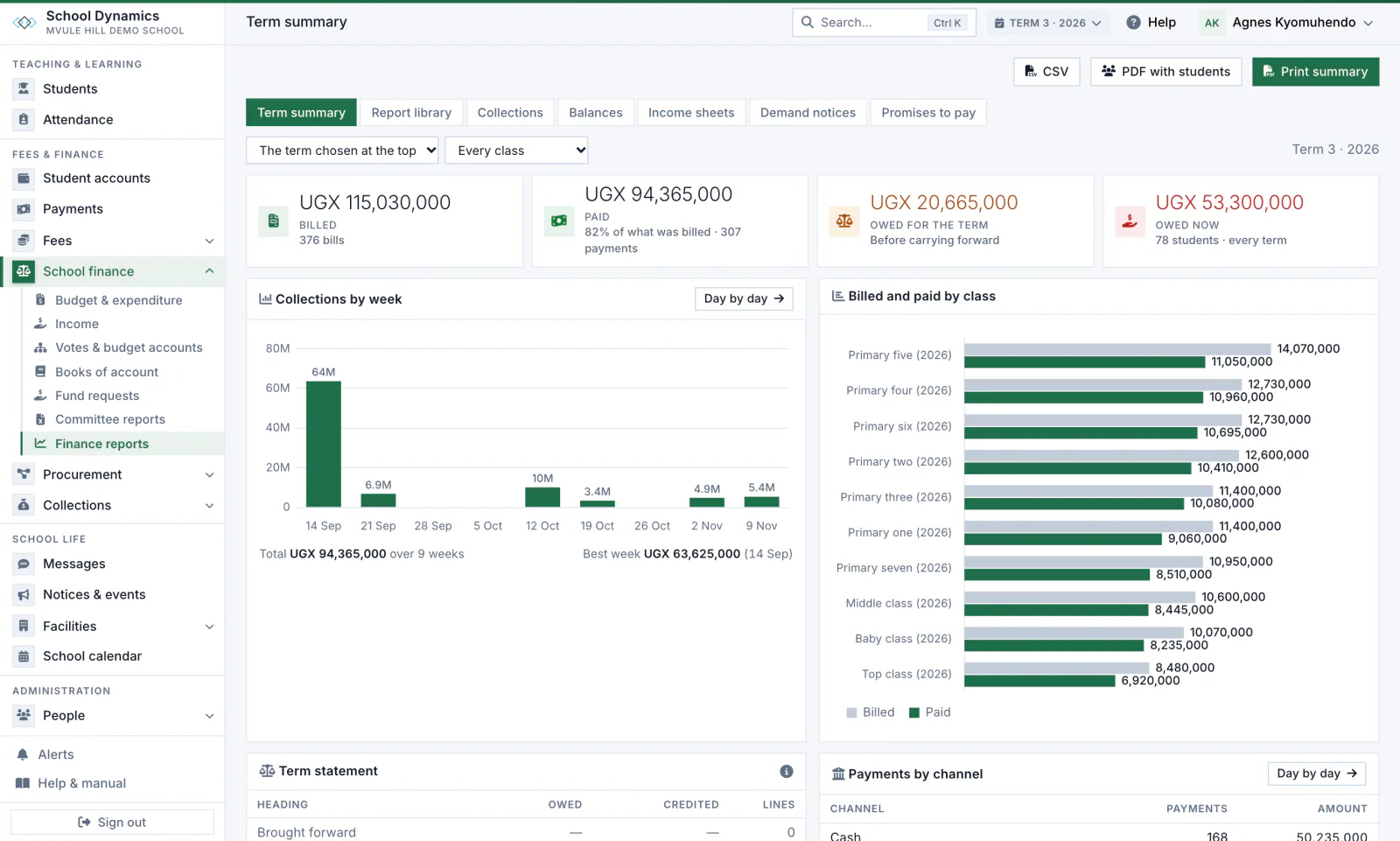
- The report pages, one tab each.
- The term (the one in the top bar to start), and a class or stream.
- Billed, paid, owed for the term and owed now.
- The summary as a PDF to print.
- Payments week by week. Day by day opens the collections.
The page starts on the term chosen in the top bar 2. Choose another term, or a class (then a stream), to see only part of the school. Whole school goes back.
The four figures 3:
| Figure | Means |
|---|---|
| Billed | Every bill of the term, with the bursaries given. |
| Paid | Every payment of the term, and what share of the bills that is. |
| Owed for the term / Paid ahead for the term | The term's balance, before carrying forward. |
| Owed now | What students owe today, every term together. Click it for the balances list. |
Below them:
- Collections by week 5 and Billed and paid by class, as charts.
- Term statement: every fees line of the term under one heading each, Charged and Paid or taken off, then the term balance and what was carried to the next term.
- Payments by channel: SchoolPay, cash, bank and the rest, with the bank.
- By class (or By stream): students, brought forward, billed, bursaries, adjustments, paid and owed for the term. Click a class for its students, each with what they owe now; streams beside a class shows its streams.
Print summary 4 makes a PDF. PDF with students adds every student's line, and CSV downloads the figures for a spreadsheet.
Collections#
Collections shows the money received, day by day. Choose the period: Today, This week, This month, Last month, A term or Dates. Narrow by channel, bank account, class or stream; Clear filters starts again.
The page shows what was Collected, how many Payments, the amount Per day with payments and a figure for each channel. Then:
- a table of each day, with a column for each channel;
- By bank account;
- every payment, with a search by student, registration number or receipt. The printer icon opens a payment's receipt.
Print makes a PDF, PDF with payments adds the list of payments, and CSV of payments downloads them.
Balances#
Balances lists students with what they owe or have paid ahead, today. The tabs are Owing, Paid in advance and Everyone. The figures at the top add up what is Owed, what is Paid ahead and the net.
Narrow it by name, registration number or payment code; by current class and stream; by residence (day or boarding); by status (Active is the default); or to students Owing at least… an amount. Click a column heading to sort by student, balance or last payment. Click a name for the student's account.
The icons on a row record a payment for that student, or a promise to pay when they owe. Print list makes a PDF of the list as filtered, and CSV downloads it.
Income sheets#
An income sheet is a printed list of every fee payment in a period, with a running total, on the school's letterhead. It is useful for a month's banking or for the board.
- Press Add income sheet.
- Type a Title.
- Fill the dates with This month, Last month, This quarter or Active term, or type the First day and Last day.
- Choose the Students: Day and boarding, Day scholars only or Boarders only.
- Tick the Payment channels to include, or none for every channel.
- Press Save sheet.
Print sheet opens the sheet as a PDF; the list then marks it Printed. The row menu has Edit, Day by day (the same period on the Collections page) and Delete.
Other tabs#
- Report library: every report as a table you shape, with Excel and PDF, and the committee pack. See Committee reports.
- Demand notices: see Reminders and demand notices.
- Promises to pay: see Promises to pay.