
Income is the other half of the budget. It holds the school's income sheet (every source of income), the income you expect from each source in a term beside what really came in, and money received that is not a student's bill: an old vehicle sold, a tour, uniforms sold for cash.
Open it from Fees & finance › School finance › Income. It has three tabs: Proposed against actual, Other income received and Income sheet.
Before you start#
- The bursar, the finance officer and the school administrator change the sheet, the plan and other income. The head teacher and the deputy can look.
- Fees, bursaries and services should be set up, because the sheet is made from them.
Set up the income sheet#
The first time, the page says the school has no income sheet yet.
- Press Set up from what the school has. The sheet is made with one fees line for each group of classes that pay the same fee, each bursary scheme, boarding and transport, the service categories, the store, money held and the usual other income.
- Open the Income sheet tab and read through it.
- Rename a line with its pencil, or take it out with its bin.
- Add what is missing with Line in its section, or Add income line at the top.
The sheet is in sections: School fees, Boarding, Transport, Uniforms and services, Other income, Debtors, Stock at term opening and Money at term opening. The arrows move a line up or down.
A line and where its figure comes from#
Each income line says where its actual comes from (Where its actual figure comes from):
| Choice | The line counts |
|---|---|
| Fee bills of chosen classes or bursary schemes | The fee bills, less bursaries, of the students in the classes or bursary schemes you tick. A bursary line counts its students first, so each child is counted once. |
| Service bills | Bills of the services, or whole service categories, you tick. Fill in Only bills of this amount to count one rate. |
| Other income recorded here | What you record under Other income received. |
| Fees owed, brought into the term | What students owed when the term began. |
| Staff advances and loans owed | What staff owed the school when the term began. |
| Store value at the term's start | The store items you tick (none ticked: every item). |
| Money held at the term's start | The money places you tick (none ticked: all). |
| Typed on the plan | Nothing by itself: you type its actual on the plan. |
Press Save. A line that has other income recorded under it cannot be removed: move or delete that income first. Add what is missing adds lines from the school's classes, bursaries, services and store that the sheet does not have yet.
Plan the term's income#
On Proposed against actual, choose the Term. For each line, type the Proposed qty and Proposed rate, for example 120 pupils × UGX 450,000. The page shows:
- Proposed: quantity × rate.
- Actual qty and Actual: what really came in. For lines Typed on the plan, type them.
- Difference: actual less proposed. A shortfall reads short, in red.
Press Save the plan for … (the term's name). To start from another term's plan, choose it under Copy the plan of and press Copy plan.
A row Fees not in a category counts fees of students that no fees line covers. If it is large, a class is missing from your fees lines.
Record other income#
Use it for money that is not a student's bill: an asset sold, a tour, uniforms sold for cash, registration, a grant.
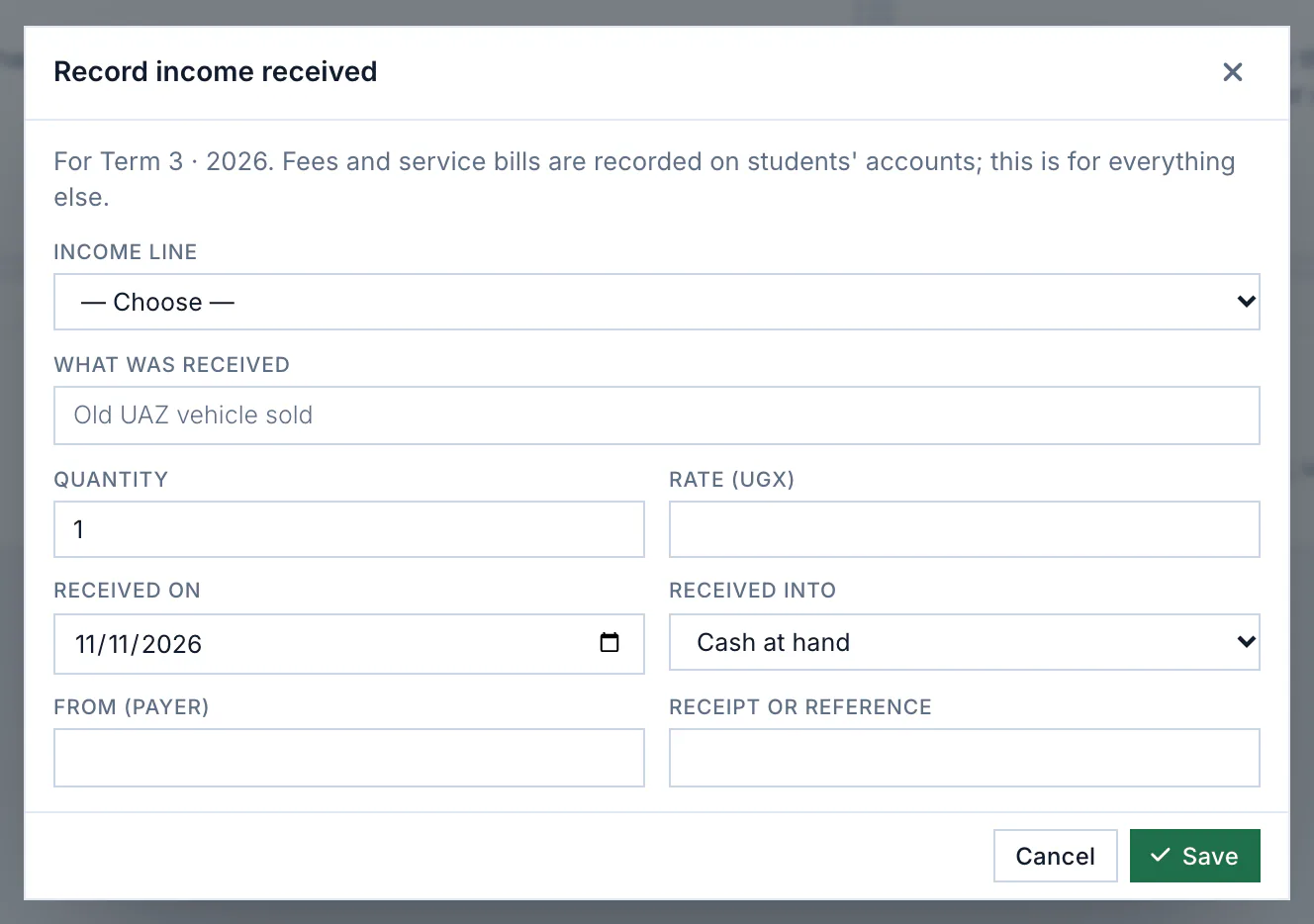
- The income line it belongs to.
- What was received.
- Quantity × rate makes the amount.
- The day it was received.
- Where the money went: cash at hand, a bank or another money place.
- Open Other income received and choose the Term.
- Press Record income.
- Choose the Income line 1. Only lines whose actual is Other income recorded here are offered.
- Type What was received 2, for example Old school van sold.
- Type the Quantity and the Rate (UGX) 3.
- Check Received on 4. It cannot be in the future.
- Choose where it went under Received into 5. It starts at Cash at hand.
- Add From (payer) and the Receipt or reference if you have them.
- Press Save.
The list shows each amount received in the term, with its total. Narrow it to one line with the line list. Change an entry with its pencil, or delete it with its bin.
Good to know#
- Income schedule at the top opens the committee's income schedule for the term: every source, proposed against actual, then spending and the surplus. See Committee reports.
- Other income goes into the Books of account by itself, into the money place you chose.
- The Income sheets under Finance reports are something else: printed lists of fee payments for a period. See Finance reports.