
The Books of account are the school's double entry books. You do not type into them twice: fees, spending, credits, payments to creditors and other income each post themselves as a balanced journal. The trial balance, income and expenditure account, balance sheet, general ledger and cash book are made from them.
Open them from Fees & finance › School finance › Books of account. The page has six tabs: Overview, Chart of accounts, Journals, Money, Opening balances and Where money lands.
Before you start#
- The bursar, the finance officer and the school administrator make changes. The head teacher and the deputy can read everything.
- The books are only as good as what is recorded: fees and payments, expenditure, creditors and other income.
The overview#
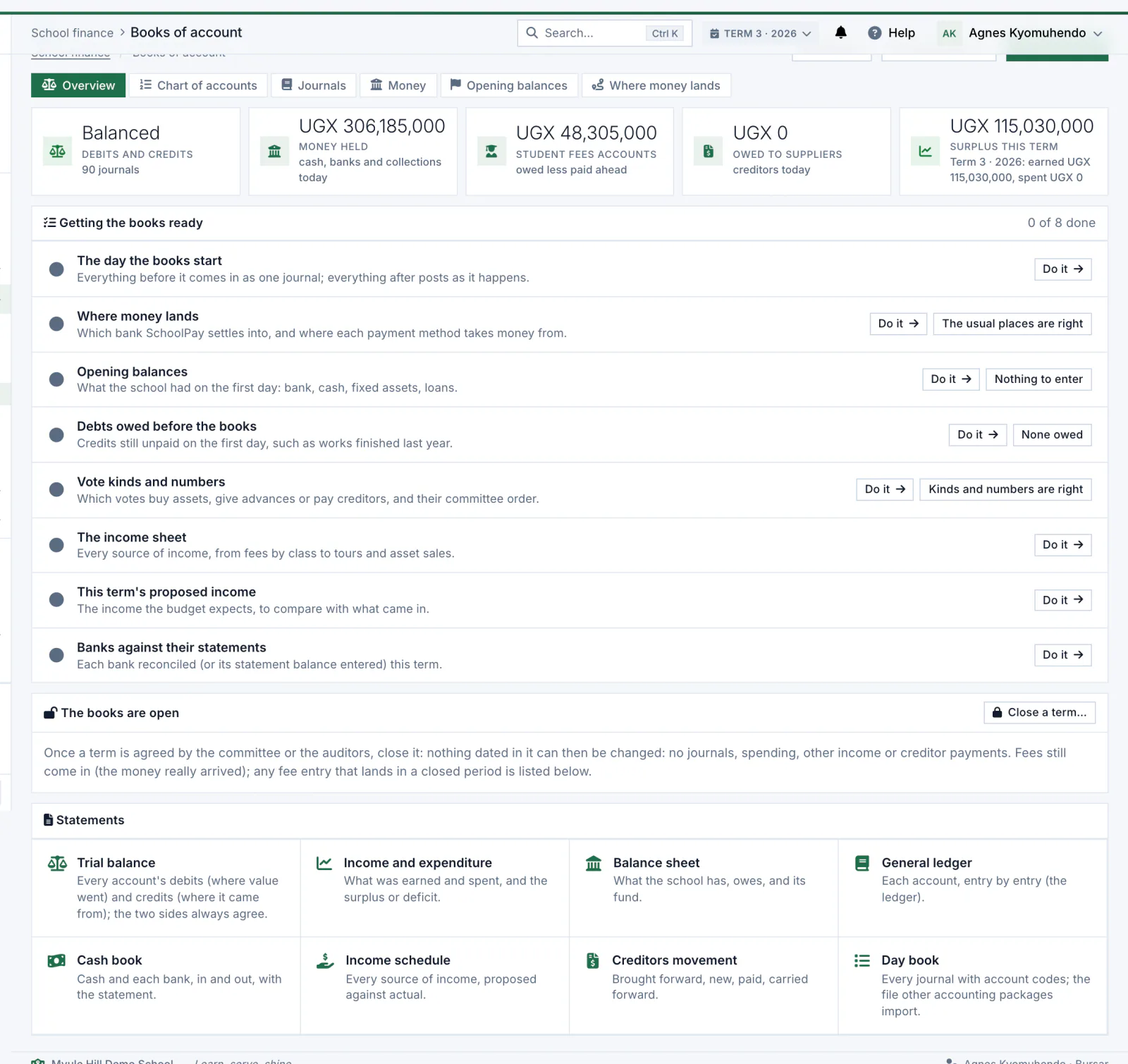
- The six parts of the books.
- Whether the books balance, money held, owed by students and to suppliers, and the term's surplus.
- Close a term once the committee or the auditors agree it.
- The statements: trial balance, income and expenditure, balance sheet and more.
- Add a journal for what nothing else records.
The figures 2:
| Figure | Means |
|---|---|
| Debits and credits | Balanced when the two sides agree, as they always should. |
| Money held | Cash, banks and collections today. |
| Student fees accounts | What students owe, less what they paid ahead. |
| Owed to suppliers | Creditors today. |
| Surplus this term / Deficit this term | What was earned less what was spent, in the term chosen in the top bar. |
Statements 4 opens each report in the report library: Trial balance, Income and expenditure, Balance sheet, General ledger, Cash book, Income schedule, Creditors movement and Day book (every journal with account codes, the file other accounting packages import). See Committee reports.
Get the books ready#
Until everything is in place, the overview shows Getting the books ready, with each step and whether it is done:
- The day the books start. Everything before it comes in as one journal; everything after posts as it happens. Set it under Where money lands.
- Where money lands. Which bank SchoolPay settles into, and where each payment method takes money from. If the usual places are right, press The usual places are right.
- Opening balances. What the school had on the first day: bank, cash, fixed assets, loans. If there is nothing, press Nothing to enter.
- Debts owed before the books. Credits still unpaid on the first day: add each one in Creditors as Owed before the books, or press None owed.
- Vote kinds and numbers. Which votes buy assets, give advances or pay creditors, and their committee order: see Votes and budget accounts.
- The income sheet and This term's proposed income: see Income.
- Banks against their statements. Each bank reconciled, or its statement balance entered, this term (see Money below).
Do it on a step takes you where it is done. A step you marked done yourself can be taken back with Undo.
Where money lands#
On the Where money lands tab:
- The books start on: the first day of the books. Leave it empty to post everything from the beginning.
- Fees received through: for SchoolPay, cash payments, bank payments, PegPay, the bursar's app and online (Pesapal), the money place the money goes into.
- Spending and creditor payments paid by: for each payment method, the money place it leaves from, and the Main bank for transfers and cheques.
The usual place is right for most schools: a fee payment's own bank account, cash into cash at hand, transfers and cheques from the main bank, mobile money from the mobile money account. Press Save settings.
Opening balances#
On Opening balances, choose the day (On) and type each balance on its usual side: what is in each bank, what the furniture is worth, what a loan still owes. The difference goes to the opening fund. Press Save opening balances. Another asset adds an account for something not listed.
Two things do not go here: student balances come from their fees accounts, and debts to suppliers from Creditors › Add credit › Owed before the books.
Journals#
The Journals tab lists every entry: date, details, what it came from (Fees ledger, Spending, Credit, Payment to a creditor, Other income, Journal, Money moved, Opening balances …), reference and amount. Narrow it by kind or search the details. Click one to see its lines.
A journal that came from a record says so: change or delete that record, and the journal follows. A journal or money move you added here can be undone with Reverse journal, which adds its mirror image today.
Add a journal#
For what nothing else records: depreciation, a correction, an accrual.
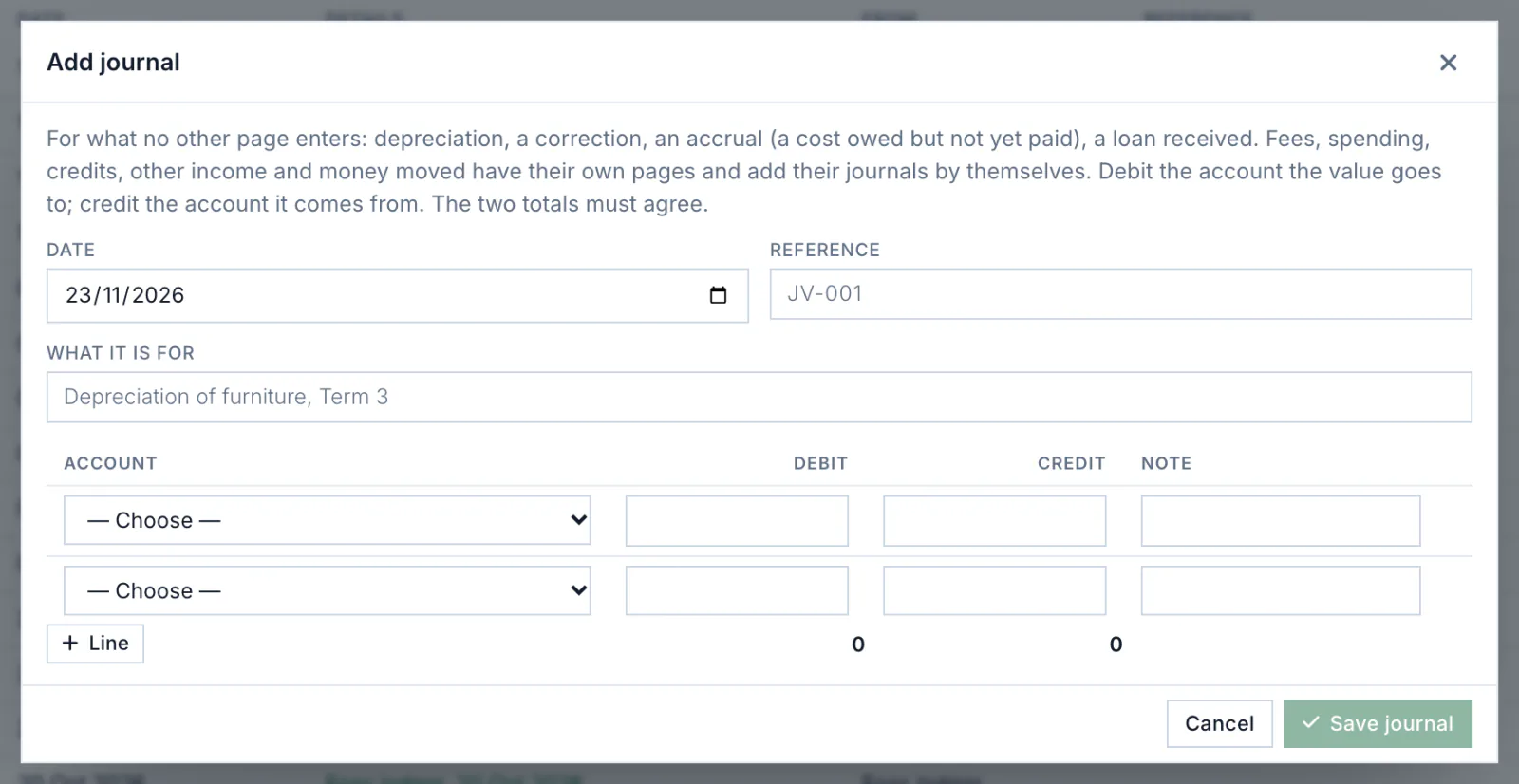
- The journal's date.
- What it is for.
- An account for each line.
- A debit or a credit on each line, never both.
- Saves only when debits equal credits.
A journal needs at least two lines, and a line cannot have both a debit and a credit.
Quick entry#
Quick entry posts common journals for you: Loan received, Loan repayment (with its interest), Staff advance repaid, Capital grant or contribution and Depreciation. Fill in the amount, the money place and who it is with, check the lines it shows, and press Post. For depreciation, the asset register's fall in value this term is offered: press Use it.
Chart of accounts#
The Chart of accounts tab lists every account by type: Assets, Liabilities, Fund, Income and Expenses, each with its code and balance today. Ledger opens the account entry by entry.
Add account (or Add under a type) asks for the Type, a Code of 3 to 6 digits in the type's range, the Name and a Note. Tick Money is kept here for a new money place, such as petty cash or a savings account, so money can be paid from it and received into it. Accounts marked Kept by the books can be renamed or deactivated, but not deleted. An account named after a vote or a bank is renamed by renaming that vote or bank. An account with entries is deactivated, not deleted, so its history stays.
Money#
The Money tab lists each money place with its balance in the books today, the last statement balance and the difference (Agrees when there is none).
- Move money from here… (or Move money at the top): cash banked, bank to petty cash, SchoolPay settled into the bank. It is neither income nor spending.
- Statement balance only…: what the bank statement says the place held at the end of a day.
- Cash book: the place's money in and out, with the running balance.
Reconcile a bank#
- Press Reconcile on the bank.
- Type the Statement's last day and its Closing balance (UGX). Press Start reconciling.
- Tick each entry the statement shows. Tick all and Untick all help.
- Watch the Difference. At Nil, everything is accounted for.
- Press Finish reconciliation. If a difference remains, say Why it differs first, for example a deposit the bank has not credited yet.
Bank charges are recorded as spending, and interest as other income. Discard throws away an unfinished reconciliation and its ticks.
Close the books#
Once the committee or the auditors agree a term, close it.
- On the overview, press Close a term… (or Close further…).
- Choose a term that has ended, or a day under Close up to and including. It must be yesterday or earlier.
- Press Close the books.
From then on, nothing dated on or before that day can be added, changed or deleted: journals, money moved, opening balances, spending, other income, creditor payments. Someone who tries is told The books are closed up to ….
Fees still come in, because the money really arrived. A fee entry that appears or changes in the closed period is listed on the overview, under entries changed after the books closed. Press Noted on each, or Mark all noted.
To change something in a closed term, press Reopen…, say Why (it is kept in the finance activity log), and choose Keep closed up to to reopen only part. Press Reopen.