
The visitors' book keeps everyone who comes to the school: who they are, who or what they came for, when they came in and when they left. Open it from Care & safety › Visitors. There are two tabs: Visit log (the visits) and Visitors (the people).
Before you start#
The receptionist, security, the gate keeper, the head teacher, the deputy head teacher, the director of studies and the school administrator can use the visitors' book.
Sign a visitor in#
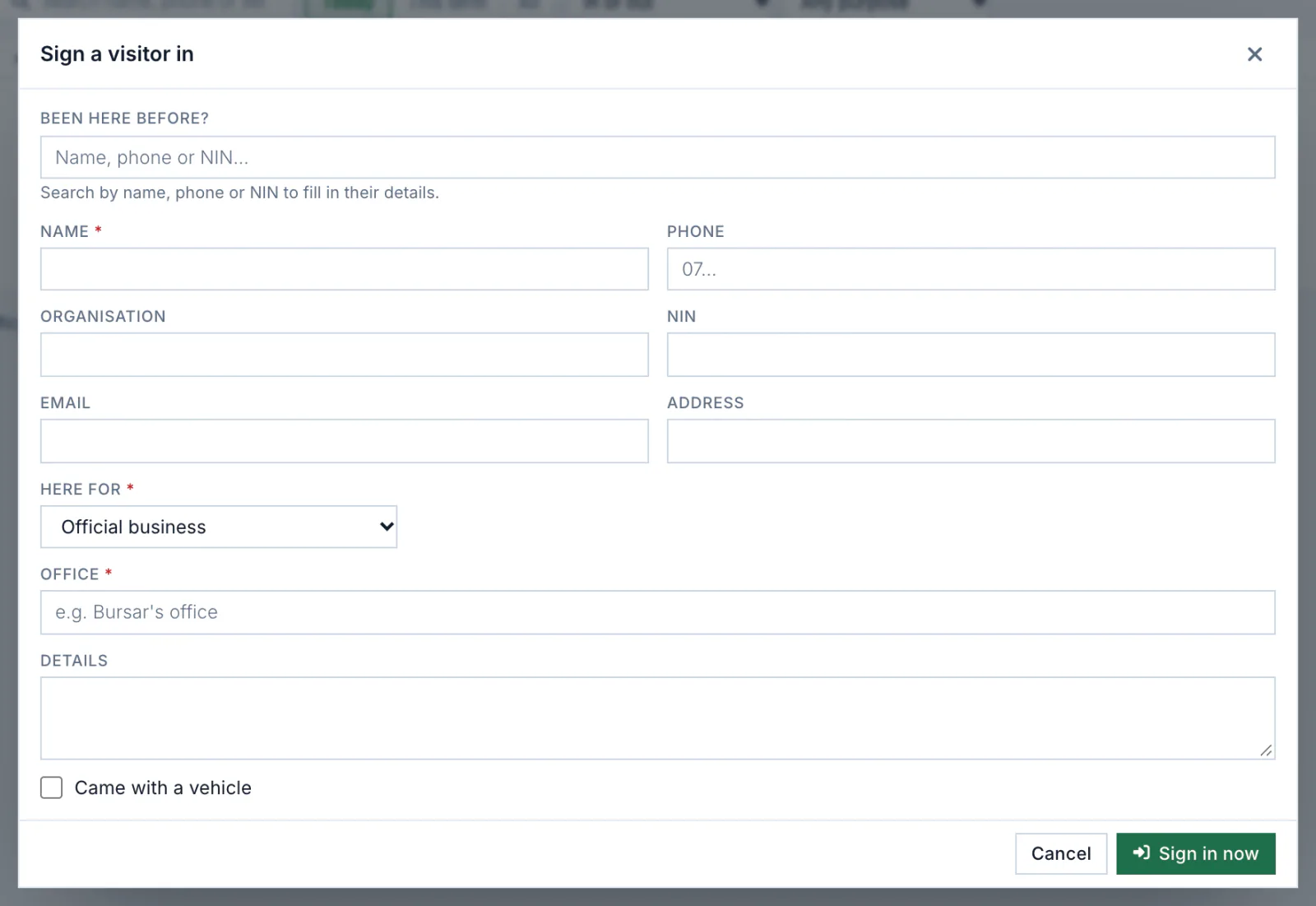
- Been here before? Find them by name, phone or national ID
- The visitor's name
- What they came for
- Which office (or the person they came to see)
- Tick it to record the vehicle's number plate
- Sign them in at the time now
- On the Visit log tab, press Sign a visitor in.
- If they have been here before, type their name, phone number or national ID number in Been here before? 1 and click them. Their details fill in. (Press Not them? if you picked the wrong person.)
- Otherwise, type the Name 2, and the phone, organisation, National ID (NIN), email and address you have.
- Choose what they are Here for 3: Official business, A member of staff, A student or Something else.
- Fill the box that appears 4: the Office, the Member of staff, the Student (type a name or student number and click them), or the Reason.
- If they came with a vehicle, tick Came with a vehicle 5 and type the Vehicle registration.
- Press Sign in now 6.
The visit is signed in at the time now, and appears at the top of the log with Still in.
Sign a visitor out#
When the visitor leaves, press Sign out on their row and confirm. The time out is the time now.
The eye button opens the whole visit: contacts, what they came for, the times, the vehicle, and who signed them in. A visitor still in can be signed out from there too, with Sign out now.
Read the log#
The top of the Visit log counts the visitors On the premises (signed in today and not yet out), the Visits today and the Visits this term.
The log shows Today to start with. Switch to This term or All. Search by name, phone, vehicle or organisation, or narrow it by In or out and by purpose. Export downloads the visits the filters show, as a spreadsheet.
Click a visitor's name for a quick view: how many times they have come, when they last came, and their last visits.
The visitors#
The Visitors tab lists every person who has visited, with their phone, organisation, number of visits and last visit. A visitor is added the first time they sign in. Search by name, phone, organisation or national ID.
To correct a visitor's details, press the pencil on their row of the register, or Edit in their quick view, then Save visitor. Open full page (in the quick view) opens the visitor's page with every visit, and Edit there does the same.
Visits from the phone app#
The gate can sign visitors in on the phone app, even without internet; the app sends the visits when it is back online. They appear in the same log, with a signature when the visitor signed on the phone.