
A conduct note records something a student did, good or bad, what the school did about it, and the comments of the head teacher, the class teacher, the parent and the student. Notes are kept term by term, so you can see a student's conduct over the years.
Open School life › Care & safety › Discipline.
Before you start#
- Anyone who may see students can read the conduct notes.
- Teachers, the director of studies, the head teacher, the deputy and the school administrator can add, edit and comment.
- The school needs an active term: every conduct note is filed under it.
Record conduct#
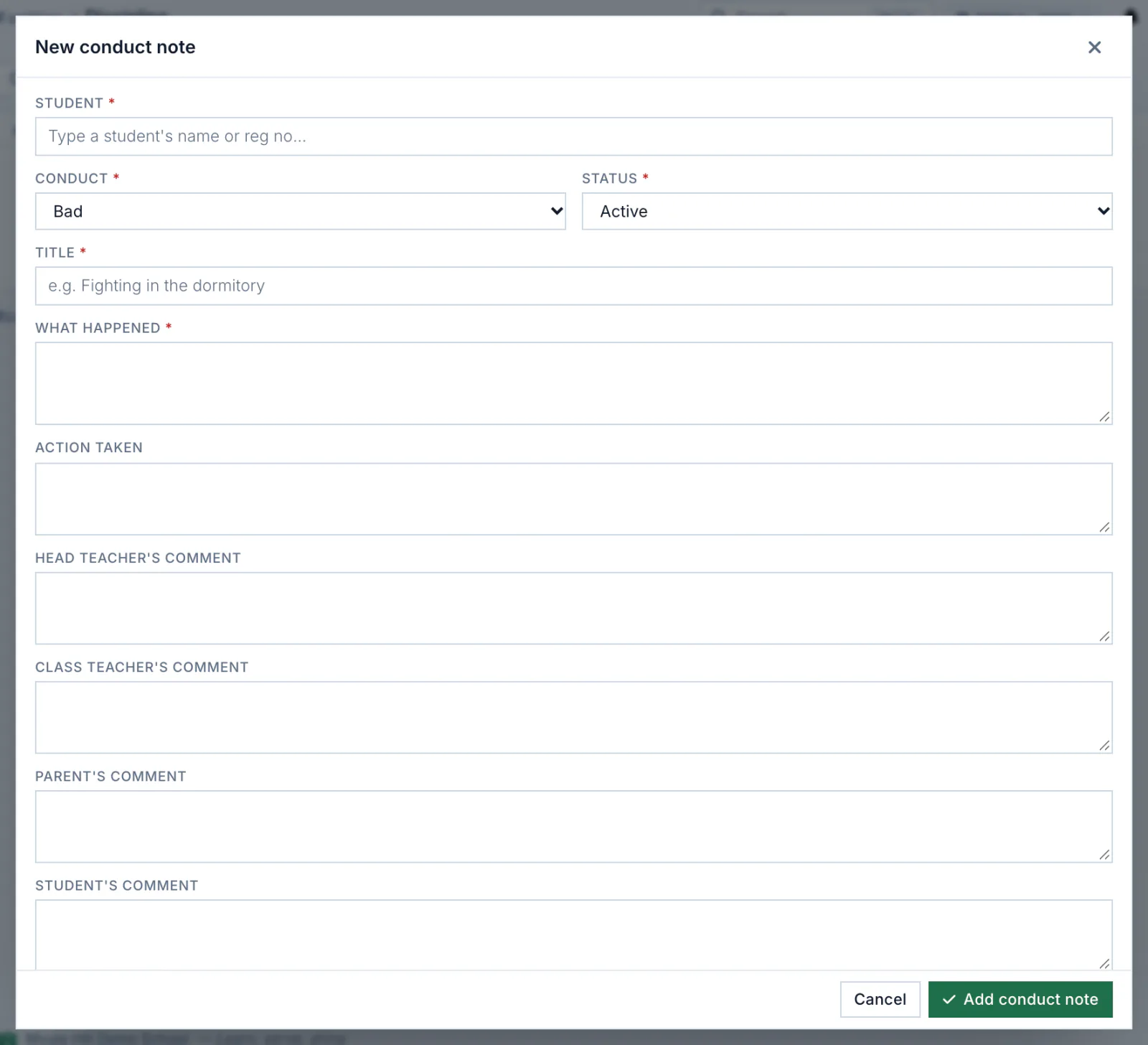
- Type the student's name or reg no., then pick them.
- Good or bad conduct.
- A short title, such as Fighting in the dormitory.
- What happened.
- What was done, and the comments, when you know them.
- Add the note.
- Press Add conduct note.
- Type the student's name or reg no. 1 and pick the student from the list. Active and pending students are listed.
- Choose the Conduct 2: Bad or Good. Leave the Status as Active.
- Type a Title 3 and What happened 4. Both are required.
- Add the Action taken 5 and the comments you have: Head teacher's comment, Class teacher's comment, Parent's comment, Student's comment. You can add them later.
- Press Add conduct note 6.
The note is saved with your name, the date and the active term.
A photo or a document#
At the foot of the form, Photo takes a picture (JPG, PNG or WebP) and Document a file such as a written statement, a letter to the parents or a scanned report (PDF, Word, Excel, text or a picture, up to 10 MB). A paperclip on the row shows a note that has one.
When editing, a new photo or document replaces the one kept; tick Take the photo off or Take the document off to remove it from the note.
Find and read conduct notes#
The list shows every conduct note, newest first, with the date and term, the student and their class, Good or Bad, the title, the action taken, who recorded it and the status. Search by the student's name, reg no. or the title, and filter by Good and bad, Any status and the term.
Click a student's name to see only their notes. The page then shows how many good and bad notes they have, and Add conduct note is for that student.
The eye on a row opens the whole note: what happened, every comment, and the photo and document if they were added (click either to open it full size). Opening a note is written in the student's history, which the head teacher can see on the student's page.
Add comments later#
Press Edit or comment on an open note, or the pencil on its row. Add the comments as they come in and the action taken, and press Save changes. A note stays Active unless you set its Status to Inactive.
Delete note, on an open note, removes it for good. Only leaders see it.