
Every member of staff asks for leave here and follows the decision. The head teacher, the deputy or the school administrator approves or declines it. Leave is counted in working days, and each kind has its yearly leave allowance.
Before you start#
- Everyone on the staff can ask for leave and see their own requests.
- Approving, declining and recording leave for someone else is for the head teacher, the deputy and the school administrator.
- Those who see the staff list (the head teacher, deputy, director of studies, bursar and administrator) see everyone's leave, Who is away and Balances.
Ask for leave#
Open Staff & payroll › Leave. The top of the page shows how many days you have left this year. Press Ask for leave.
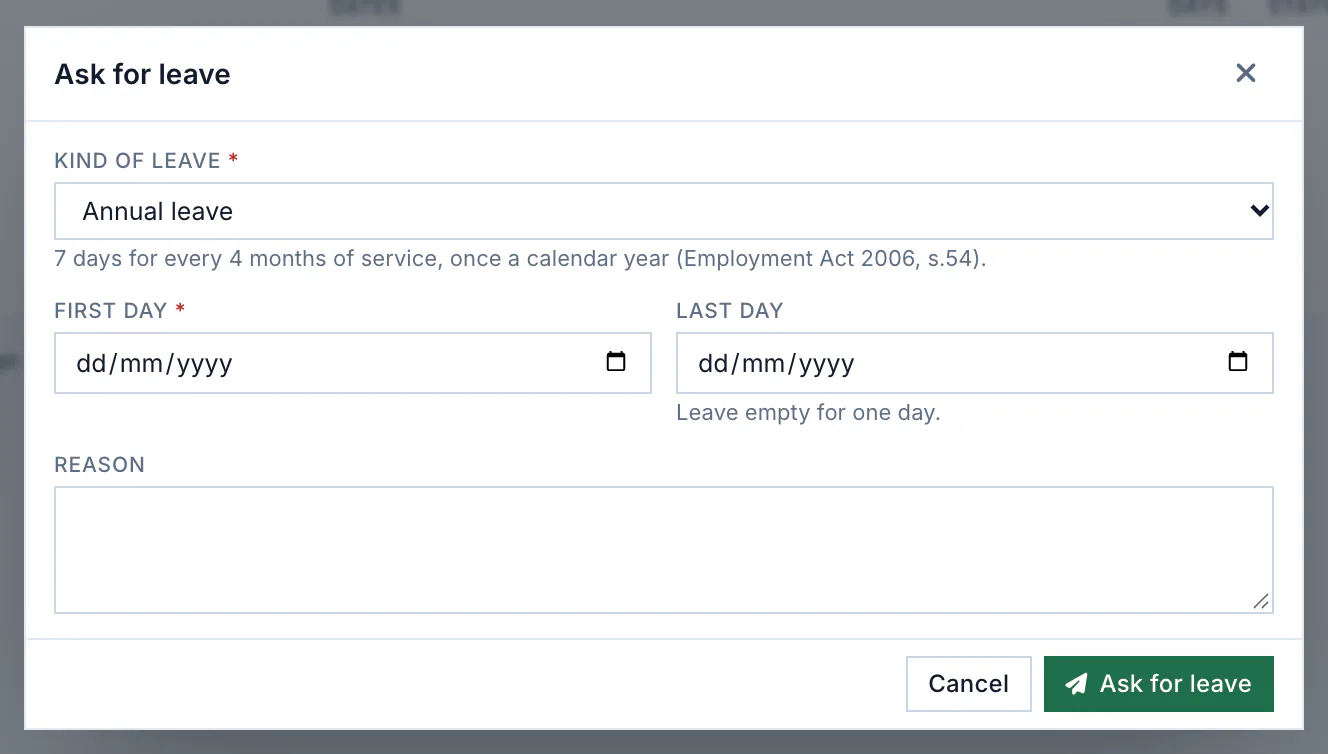
- The kind of leave. The note under it says what the law allows.
- The first day.
- The last day. Leave it empty for one day.
- Why (if you want to say).
- Ask for leave. The head teacher, deputy or administrator decides it.
Your request shows as Waiting until it is decided. When it is approved or declined, the list says so, with any note from the person who decided it.
The kinds of leave, as the school starts with them:
| Kind | Allowance a year | Pay |
|---|---|---|
| Annual leave | 21 working days (7 for every 4 months of service) | Full pay |
| Sick leave | No yearly limit: each request is decided | Full pay for the first month away; a medical certificate may be asked for |
| Maternity leave | 60 working days, for women | Full pay |
| Paternity leave | 4 working days, for men | Full pay |
| Compassionate leave | No yearly limit unless the school sets one | Full pay |
| Study leave | No yearly limit unless the school sets one | Full pay |
| Unpaid leave | No yearly limit | Unpaid |
The request is refused, with a sentence saying why, when:
- the dates are all days off (Those dates are all days off (weekends or public holidays). Choose working days.);
- it crosses 31 December (Leave is counted per calendar year. Split leave that crosses 31 December into two requests.);
- it overlaps another request of yours that is waiting or approved;
- it asks for more than is left. Requests still waiting count too, so two requests cannot both pass the limit;
- it is more than 120 working days (split it into parts).
To take back a request that is still waiting, open it and press Cancel leave. The days are given back.
Approve or decline leave#
Requests waiting for a decision come first in the list, and Waiting for a decision counts them.
- Open the request (click its kind of leave), or use the tick or cross on its row.
- Read it: the working days, what the person has left of that kind this year, whether it is paid, and the reason.
- Press Approve leave or Decline leave.
- Type a Note. When you decline, say Why it is declined: the person will read it.
- Press Approve leave or Decline leave in the box to confirm.
If the person is on the duty roster while away, the request and the approve dialog list those duties. Approving keeps the duty: the roster then marks the clash so a replacement can be found (see Duty roster).
Nobody decides their own leave: Someone else decides your own leave. The school's owner is the only exception.
An approver can also cancel leave that is waiting or already approved: open it and press Cancel leave.
Record leave for someone#
When someone could not ask in advance (sick leave, for example):
- Press Ask for or record leave.
- Choose Who.
- Fill in the kind, the dates and the reason.
- Keep Already agreed: record it as approved ticked.
- Press Record leave.
It is approved at once, in your name. Untick the box to put it in as a request waiting for a decision instead.
Who is away#
The Who is away tab shows a month of approved leave, day by day. Requests still waiting show with a dashed edge; untick Show requests still waiting to hide them. Weekends, days the school does not work and public holidays are greyed. Under the month, a list shows everyone away that month.
Balances and allowances#
The Balances tab shows each active member of staff and the approved days of each kind of leave they took in the year, against the allowance. A figure above the allowance is marked in red. Waiting shows days still waiting for a decision. Choose another year at the top. Export spreadsheet downloads the table.
To change the allowances, the head teacher, the deputy or the administrator presses Set allowances, types the working days a year for each kind, and presses Save allowances. Leave a box empty for no yearly limit. Annual, maternity and paternity leave always need a number, and it cannot be below the law: 21, 60 and 4 days.
Good to know#
- A working day is a day of the school's working week, less Uganda's public holidays. The Eid holidays change each year and are not left out: the approver adjusts a request that spans one.
- Approved unpaid leave is taken off the month's payslip by itself (see Payroll).
- Every request, decision and cancellation is recorded with who did it.