
Most texts that do not arrive have a plain reason: no valid phone number, an empty wallet, or a parent who asked not to get texts. This lesson shows where to find a failed text, what its reason means, and how to fix it.
Before you start#
You need to be the school administrator, the head teacher, the deputy, the director of studies, the bursar or the secretary.
Find the text#
- School life › Messages, tab All messages: every text the school sent or tried to send, one row per person. Choose Failed under the status, a bulk message, or dates, or search a name, number or words. The Failed this month figure on the Bulk messages tab opens this list with the failed ones.
- On a message's own page: one row per person it was for, with its status.
- Settings › Message settings, tab Sent: the school's ready-made messages and reminders, with the way each went.
Click a name, or the eye button, to open the text's details: the text itself, the number used, how many SMS parts (a long text goes as several SMS), the student it was about, when it was created and sent, Tried again (for example 1 of 3 times), SMS company says, and Why it failed. Under Details for support you see the exact words the SMS company or the system wrote, to read out if you ask for help. A long text also lists its parts, each with its own status.
What the status means#
| Status | Means | Do this |
|---|---|---|
| Sent | The SMS company accepted it for that number. | Nothing. |
| Waiting to send or Sending | Waiting to go, or going now. | Wait a minute. |
| Partly sent | A long text: some parts went, some failed. | Send it again: only the failed parts go. |
| Failed | It did not go. The reason is under the name. | See the table below. |
| Not sure it went | It has said Sending for more than 15 minutes. It stopped half way and may or may not have arrived. | Ask the person. Then press Mark as failed in its details, and send it again if they did not get it. |
On the Sent tab, the statuses are Sent, Failed, Not sent (asked not to get them), Waiting and Sending.
Why it failed, and the fix#
| The reason says | Why | Fix |
|---|---|---|
| Not sent: the phone number is wrong or missing. | No number on the person's record can be read as a Ugandan mobile number. | Correct the number (see below), then send it again. |
| Not sent: the SMS wallet did not have enough money. | The wallet ran out. | Buy SMS credit, then send it again. |
| Not sent: messaging was not switched on for this school. | Your school's messaging switch is off. | See How text messages work. |
| Not sent: text messages are paused by School Dynamics. Nothing was charged. | School Dynamics had paused texts. | Send it again once texts are back. |
| Not sent: this person asked not to get SMS from the school. | The parent said no to texts. | Leave it. Change their choice only if they ask (below). |
| It stopped while sending, and someone marked it failed. | It was stuck and someone marked it failed. | Check with the person before sending it again. |
| Not sent: the SMS company refused this message. | The SMS company refused it. | Check the number and send it again. If it keeps failing, ask for help: see Getting help. |
Send it again#
- One person: press the round-arrow button on their row, or Send again in the text's details.
- Every failed text of one bulk message: on the message's page, press Send failed ones again.
Both ask first: Each part sent costs UGX 70. The wallet must cover it, or you see, for example, Sending again costs UGX 140; the wallet has UGX 40.
Only texts sent from this School Dynamics can be sent again here. A text written by the old app can be copied into a new message instead. Messages on the Sent tab cannot be sent again from there.
How the phone number is chosen#
For each person, School Dynamics looks at these numbers on their record, in this order, and uses the first that is a valid Ugandan mobile number:
- the mobile number (phone 1);
- the second phone;
- the father's phone;
- the mother's phone;
- the spouse's phone;
- the emergency phone.
A parent with no valid number gets the text on the first valid number of their child's record (the child added first). In a message to a class, a student with no parent on record is texted on the numbers of the student's own record.
A number is valid when, once spaces and signs are taken out and the 256 or 0 at the front is dropped, nine digits are left. All of these work: 0772 123456, 256772123456, +256 772 123456, +256 0772 123456, 00256 772 123456. When one box holds two numbers (0772 123456 / 0701 234567), the first valid one is used. A number with too few or too many digits is refused.
To correct a number, open the parent under Students & parents › Parents, or the student's page, and change it. See Parents and guardians.
A parent who does not want texts#
Each parent chooses for each way of messaging: SMS, WhatsApp and app notifications. Open Settings › Message settings and the Parents' consent tab. The figures at the top count the parents who agreed to WhatsApp and those who said no. The list shows each parent's choice for each way; search a name or phone, or choose a way and a choice.
Click a parent to see their choices and record a change.
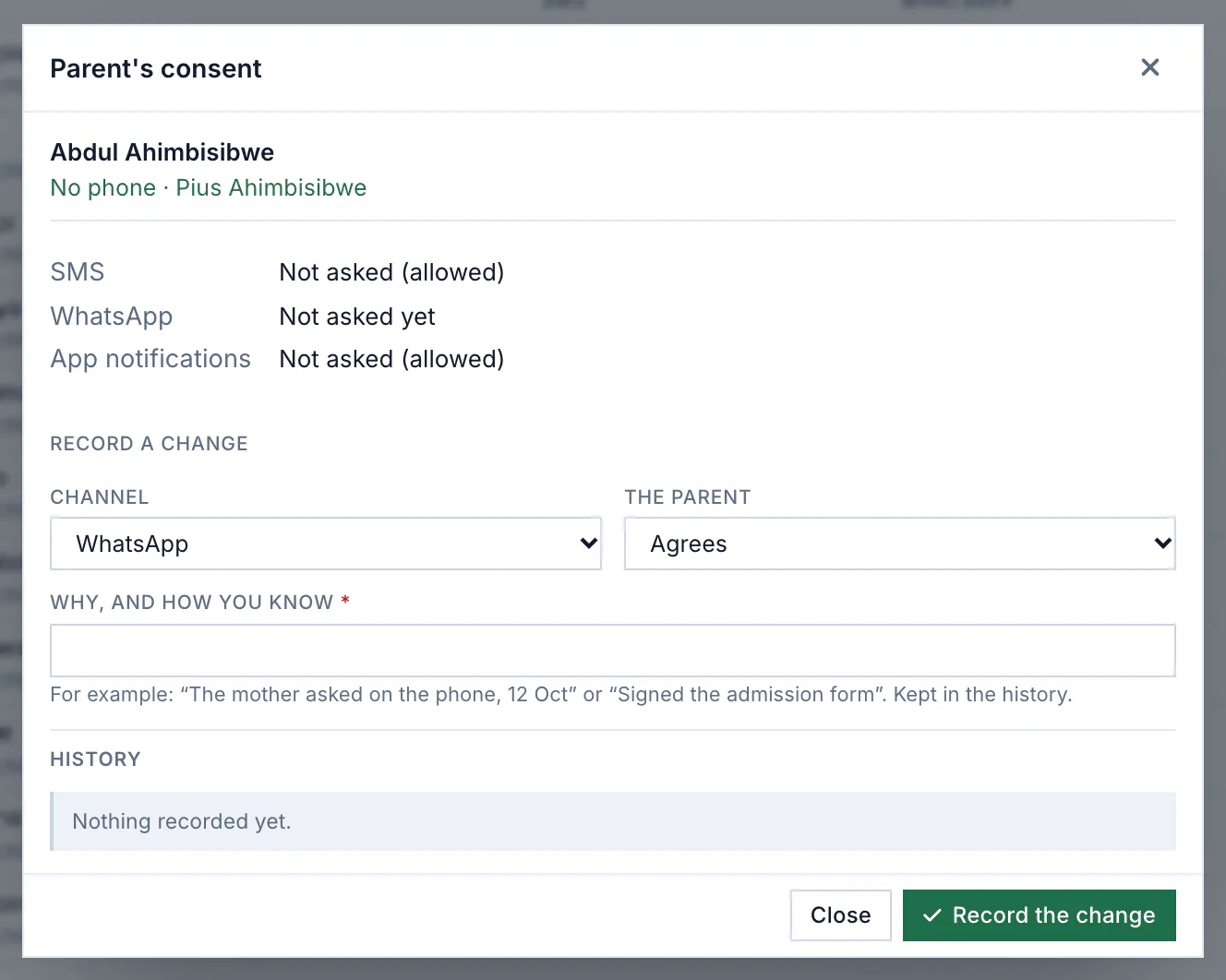
- What this parent has agreed to, way by way.
- The way: SMS, WhatsApp or app notifications.
- Agrees or Says no.
- Why, and how you know. It is kept in the history.
- Record the change.
Every change is kept in the History, with who made it and why. Parents can also say no themselves: in the phone app, with the stop link, or by replying on WhatsApp. The history says which.
- A parent who said no to SMS gets no texts from the school. Their row says Not sent: this person asked not to get SMS from the school., and nothing is charged.
- WhatsApp goes only to parents who agreed, unless your school chose on the Channels tab that its admission form already asks parents to agree.
- When WhatsApp cannot reach a number, the parent is marked not on WhatsApp, and they get SMS instead.
Good to know#
- Apostrophes and curly quotes are taken out of a text before it is sent, because the SMS company's system does not accept them.
- A parent's sign-in code is hidden in the log as six stars once the text has gone or the code has been used.