
The dashboard is the first page after you sign in. It opens on what to do and what to look at, for your role: no greeting, no clutter. Go back to it at any time by clicking the school's name at the top of the menu.
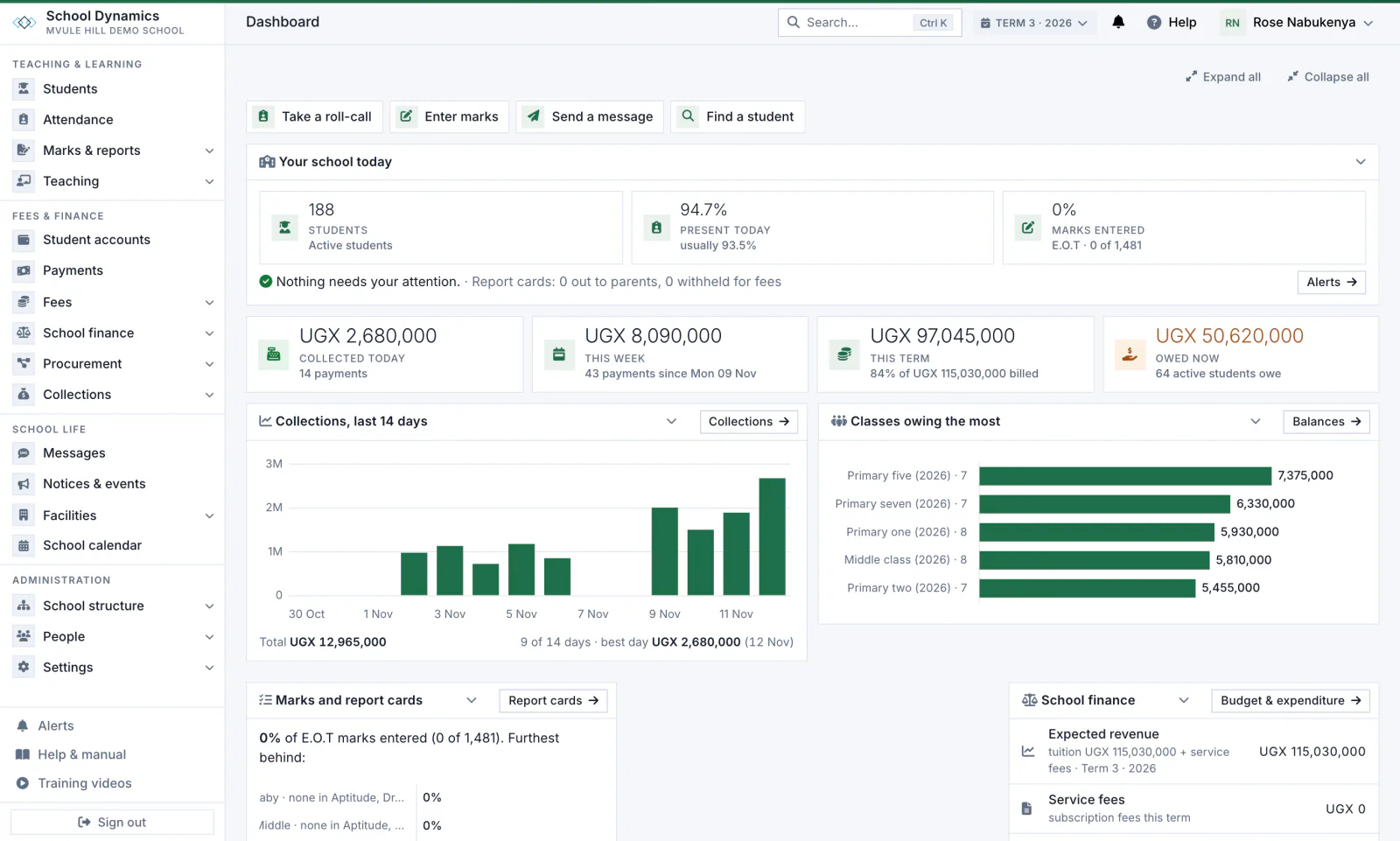
- Your most used actions: each opens its dialog or page.
- Your school today: students, attendance, marks and what needs you.
- Fees: collected today, this week, this term, and owed now.
- Fold or open every card at once.
Quick actions#
The buttons at the top 1 are the jobs your role does most, up to four of them; any more are under the ⋯ button beside them. Each one opens its dialog or page straight away:
Record a payment · Admit a student · Take a roll-call · Enter marks · Send a message · Sign in a visitor · Sick-bay visit · Lend a book · Find a student
You see only those your roles allow, in that order.
Your school today#
The head teacher, deputy and school administrator start with Your school today 2:
- Students: active students, and how many joined this term.
- Present today: the share of students present in today's closed class roll-calls, against what is usual for the school. It is marked in amber when today is more than 5 points below the usual. No roll-call closed yet means none is finished today.
- Marks entered: how far marks entry is for this term's exams.
- A line with how many things need attention (and how many to act now), and how many report cards are out to parents or withheld for fees. Alerts opens the list (see Alerts).
Fees at a glance#
Everyone who may see fees (the school administrator, head teacher, deputy, bursar and finance officer) gets the fees figures next 3:
- Collected today, This week and This term (with the share of the term's bills paid);
- Owed now: what active students owe, and how many owe;
- Collections, last 14 days: a small chart of each day's payments;
- Classes owing the most, which opens the balances report.
The cards#
Below come cards for your work, the most useful for your role first. The button on a card's title bar, such as All alerts or Report cards, opens its full page.
| Card | Shows | Who sees it |
|---|---|---|
| Needs attention | The six most pressing alerts for you | Everyone, except leaders (their alerts are in Your school today) |
| Marks entered this term | Each exam's progress, with a link to the report settings | Director of studies (leaders have it in Your school today) |
| Marks and report cards | Marks entered, the classes and teachers furthest behind, report cards out to parents, withheld for fees and not ready | Director of studies, leaders |
| Class attendance | Present today and this week, and who missed most this week | Those who see students (not leaders, who have it in Your school today) |
| Students | Active students by class, students with no class, online applications waiting | Those who see students (not leaders) |
| Collections by channel | Today's and this week's payments by channel, SchoolPay payments (working or not), promises to pay and plan instalments overdue | Bursar, finance officer, school administrator |
| Promises to pay | Promises overdue and due this week (only while one is open) | Those who see fees |
| School finance | Expected revenue, spending against the budget, stock held, bursaries this term, students cleared, accounts not yet verified | Those who see fees |
| My class today | Your class's roll-calls today and marks still due | A class teacher |
| My lessons today | Today's lessons and invigilation, and My week | Anyone with lessons on this year's timetable |
| My marking | Marks due and work waiting to be marked | Teachers who teach a subject |
| Waiting for your review | Lesson plans and schemes of work sent for review | Leaders, director of studies |
| Messages | The SMS wallet, and messages sent and failed this month | Those who send messages |
| Around the school | Visitors on site, sick-bay visits, library loans overdue, hostel beds free, store items low | The staff who look after each |
| Transport | Students riding, routes, vehicles and trips this month | Those who manage transport |
| Semester enrolment | Who is enrolled this semester | Universities only |
A card with nothing to show stays out of the way: Promises to pay appears only while a promise is open.
Fold the cards you do not need#
Click a card's title to fold it away; click again to open it 4. Folded cards stay folded on this computer. Collapse all and Expand all fold or open every card at once.
Notices at the top#
The dashboard puts the school's urgent notices above everything:
- This school has no active term: fees, roll-calls and marks have nowhere to go until one is set (see Years and terms).
- A new school's set-up checklist, until it is done (see First-week checklist).
- A licence bill that is due, for the people who handle it, with See the bill (see Licence and billing).