
An alert is something the school's own figures say needs attention: a class far behind in marks, a roll-call not taken this morning, a student whose attendance and marks are both falling. Each alert says why, in figures you recognise, and has a button to the page that fixes it.
Open Alerts at the foot of the menu. The number beside it is how many are open for you. The dashboard shows the most pressing ones too (see The dashboard).
Read the page#
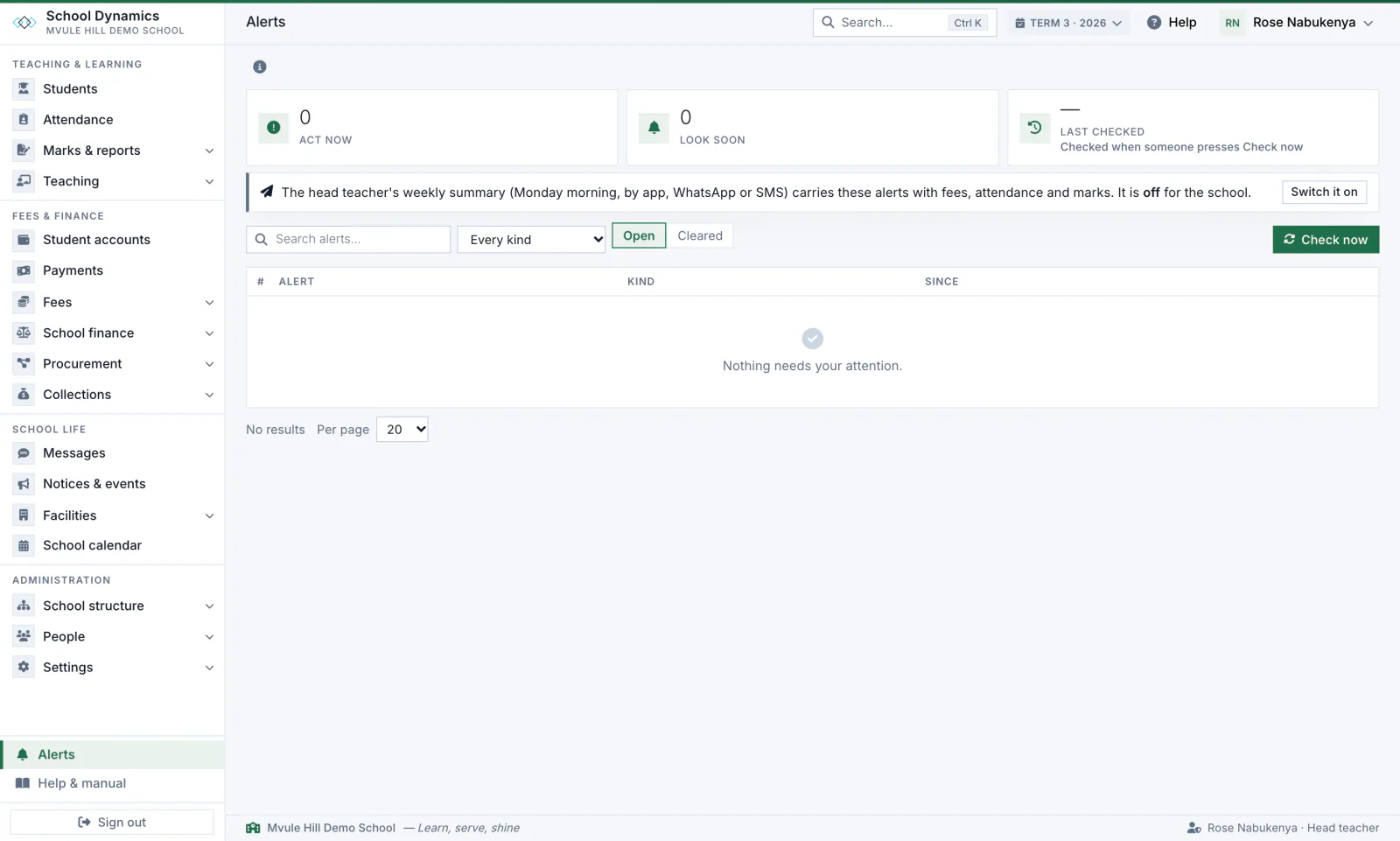
- How many to act on now, how many to look at soon, and when the school was last checked.
- Show one kind of alert.
- Open alerts, or those cleared in the last 30 days.
- Check the school now (head teacher and administrator).
- Each alert, most pressing first, with the button that fixes it.
At the top 1:
- Act now: the most urgent;
- Look soon: worth a look this week;
- Last checked: when the school was last checked, and how often.
The list 5 puts the most pressing first. Each row has the alert, its first reason, its kind and since when. Its button (Enter the marks, Take a roll-call …) opens the page that fixes it. The eye button opens the alert's quick view: every reason, when it was first seen and last checked, and who it is for.
To narrow the list, type in Search alerts…, choose a kind 2, or press Cleared 3 to see what was put right in the last 30 days.
The kinds of alert#
| Kind | When it appears | Who sees it | Its button |
|---|---|---|---|
| Students at risk | An active student shows at least two of three signs: attendance falling (the last two weeks 10 points below the six weeks before, or under 75%), marks dropping (the latest exam's average 10 points below the one before), fees overdue (owes at least UGX 50,000 and nothing paid for 30 days). All three is Act now. | Leaders, the director of studies, and the class teacher | Open the student |
| Marks entry behind | A class's share of marks entered for the exam now being entered is 25 points or more below the school's own share. | The director of studies, leaders, and the class teacher | Enter the marks |
| Roll-call not taken | On a school day, after 10:00, a class or stream whose roll-call is usually taken has none today. If no class has one at all, there is one alert for the whole school. | The class or stream teacher, leaders and the director of studies. The alert for the whole school goes to everyone who takes roll-calls. | Take a roll-call |
| Collections behind | From the 7th day of the term: the share of this term's bills collected so far is 10 points or more behind the share collected by the same day of the last three terms. | Those who see fees | See collections |
| SchoolPay | No payments fetched for 24 hours, the last five tries to fetch them failed, or payments fetched more than two days ago are still not imported. | Those who see fees | Open the sync log or Import payments |
| SMS wallet | The SMS wallet is below its low line. | Those who send messages | Top up the wallet |
Act on an alert#
- Press the alert's button, or open its quick view and press the button there.
- Fix what it is about on that page: enter the marks, take the roll-call, import the payments.
- The next time the school is checked, the alert moves to Cleared on its own.
If the same problem comes back later, the alert opens again as new.
Check now#
The head teacher, the school administrator and the school's owner have Check now 4. It checks the whole school at once and says what it found: Checked. 4 alerts open, 2 cleared. Use it after fixing several things, or when Last checked says the school is checked only when someone presses it.
The weekly summary#
The head teacher and the school administrator see a note about the head teacher's weekly summary: a message every Monday morning (by the app, WhatsApp or SMS) with the week's figures for students, attendance, fees and marks, and the alerts. It says whether it is on or off for the school; Switch it on or Change it opens the message templates (see Automatic messages).
AI suggestions#
Where School Dynamics has it set up, the head teacher and the school administrator also see AI suggestions. It lets teachers ask for a draft report-card comment, or exam questions on a topic. A person edits and approves every draft before it reaches a report card or the question bank. Only marks, grades, attendance rates, subjects, the class level and topics leave the school's system: never a name, a number or the school's name. Tick Allow AI suggestions in this school and press Save the choice.