
In a reverse auction the suppliers you invite bid their prices down, live, until the end time. The lowest bid usually wins and becomes a draft purchase order. Use it for a large order where several suppliers sell the same thing: food for the term, fuel, stationery.
Open it from Fees & finance › Procurement › Auctions.
Before you start#
- The bursar, the finance officer, the purchaser and the school administrator run auctions. The head teacher, the deputy and the store keeper can look.
- Invite at least two active suppliers. They bid on the supplier portal, so they need portal access (see Suppliers). A bid made by phone can be entered for them.
Set up an auction#
Start from an approved purchase request (its Put out to auction button, or its number under Approved requests waiting to be bought): its items are copied and its estimate becomes the starting price. Or press New auction. A basket from the Supplier catalogue can also become a draft auction.
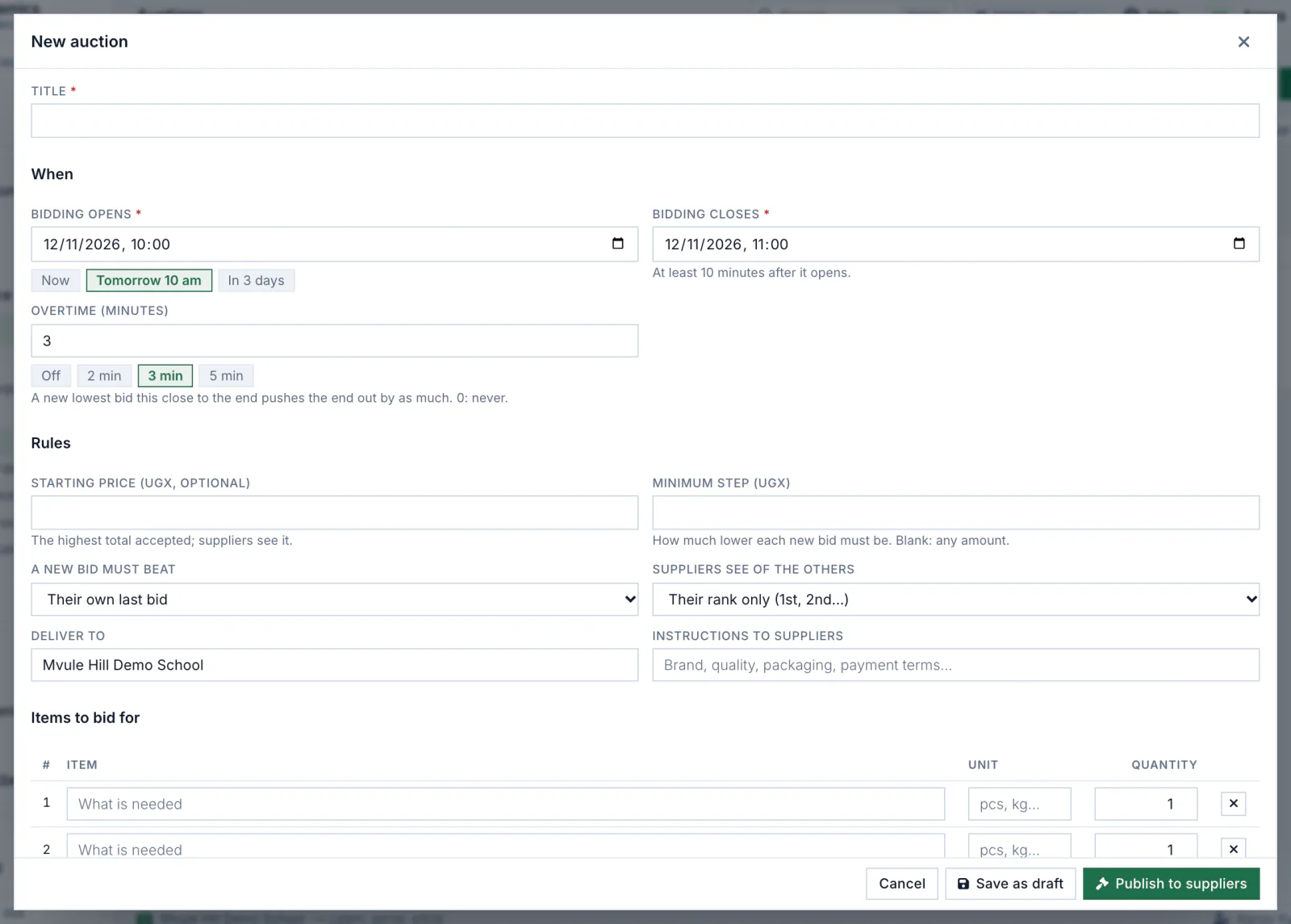
- When bidding opens.
- When it closes: at least 10 minutes later, at most 30 days.
- Overtime: a new lowest bid this close to the end pushes the end out.
- Starting price: the highest total accepted. Optional.
- How much lower each new bid must be.
- What suppliers see of the others' bids.
- Type the Title.
- Set Bidding opens 1 (Now, Tomorrow 10 am or In 3 days) and Bidding closes 2.
- Set the Overtime (minutes) 3: 0 to 30. 0 means the end never moves.
- Set the Starting price (UGX, optional) 4. Suppliers see it; no total above it is accepted.
- Set the Minimum step (UGX) 5. Blank means any amount lower.
- Choose what A new bid must beat: Their own last bid or The lowest bid so far.
- Choose what Suppliers see of the others 6: Their rank only, Their rank and the lowest bid, without names, or Nothing of the others: a sealed-bid auction.
- Check Deliver to and write the Instructions to suppliers.
- List the items to bid for: what, unit and quantity (40 at most).
- Tick the suppliers to invite. Selling … shows only suppliers whose catalogue products are in that category; Invite these … ticks every supplier shown.
- Press Publish to suppliers, or Save as draft.
The lowest bid so far only works when suppliers can see it, so choosing it sets Their rank and the lowest bid.
A draft opens on its own page with Change the auction and Publish the auction. Once published, the invited suppliers are told and it can no longer be changed.
Following it live#
The auction's page refreshes itself every few seconds while it runs.
- The clock shows Time left (or Until bidding opens), and how many times the end was extended.
- Lowest bid, Suppliers bidding, and how far the lowest bid is below the starting price (or the estimate).
- Standings: every supplier's standing bid, lowest first, with names. Equal totals: the earlier bid ranks first.
- Lowest bid over time, from the second bid.
- Prices by item, for the six lowest bids.
- Suppliers invited, with each answer: Bidding, Declined, Agreed to the rules, Looked or Not yet.
- Every bid, newest first: Standing, Replaced or Struck out.
What you can do while it runs:
- Enter a phone bid (while live): choose the supplier, type a unit price for every item, and say in How the bid came when and how it came. It follows the same rules as a bid on the portal.
- Give more time: 5 minutes to a week more, with the reason. Every invited supplier is told the new end and why.
- Strike out a bid (the eraser beside it in Standings): for a bid made in error, never to favour anyone. The supplier's bid before it stands again, and they are told why.
- Cancel the auction (in the ⋮ menu): every invited supplier is told why.
How bidding works#
- A bid prices every item. Its total is what ranks.
- A supplier's new bid replaces their last and must be lower by at least the minimum step. With The lowest bid so far, a supplier who is not leading must also go below the lowest bid by the step.
- No total above the starting price is accepted.
- A bid binds: a supplier cannot take it back.
- A bid more than 30% below the supplier's last bid (or the lowest bid, or the starting price) asks to be confirmed, in case of a missing zero.
- With overtime set, a new lowest bid in the last minutes moves the end to that many minutes after it.
- A supplier who loses the lead is told on the portal, except in a sealed auction.
Award the winner#
When bidding closes, the auction says Ended, to award.
- Press Award beside the chosen bid. The lowest one's button is the main one.
- If it is not the lowest bid, type why in Note (needed when not the lowest).
- Press Award and draft the order.
A draft purchase order is made at the bid's prices, with Won in auction AUC-… in its terms, and opens for you to check and send for approval. The winner is told the order follows once the school approves it; the others are thanked.
To end it without a winner, choose Close without an award in the ⋮ menu and give the reason.
Auction report (PDF) prints the bids, the standings and the history.
Statuses#
The list's buttons filter by them: Live, Starts soon, To award, Drafts, Awarded, Cancelled.
| Status | Means |
|---|---|
| Draft | Not published; suppliers know nothing of it. |
| Starts soon | Published; bidding has not opened. |
| Live | Suppliers are bidding. |
| Ended, to award | Bidding closed; choose the winner. |
| Awarded | A bid won; its order is drafted. |
| Cancelled | Stopped, with the reason. |