School Dynamics
How text messages work
The SMS wallet and what a text costs, the switches that let your school send, and why every automatic message starts off.
Text messages (SMS) are paid for from your school's SMS wallet. This lesson explains where that money comes from, what each text costs, and the switches that decide whether anything is sent at all. Read it before you send your first message.
Before you start
The Messages pages and Settings › Message settings are for the school administrator, the head teacher, the deputy, the director of studies, the bursar and the secretary.
The settings page
Open Settings › Message settings (or the Settings tab on the Messages page). The first tab, Channels, shows everything on this page at a glance.
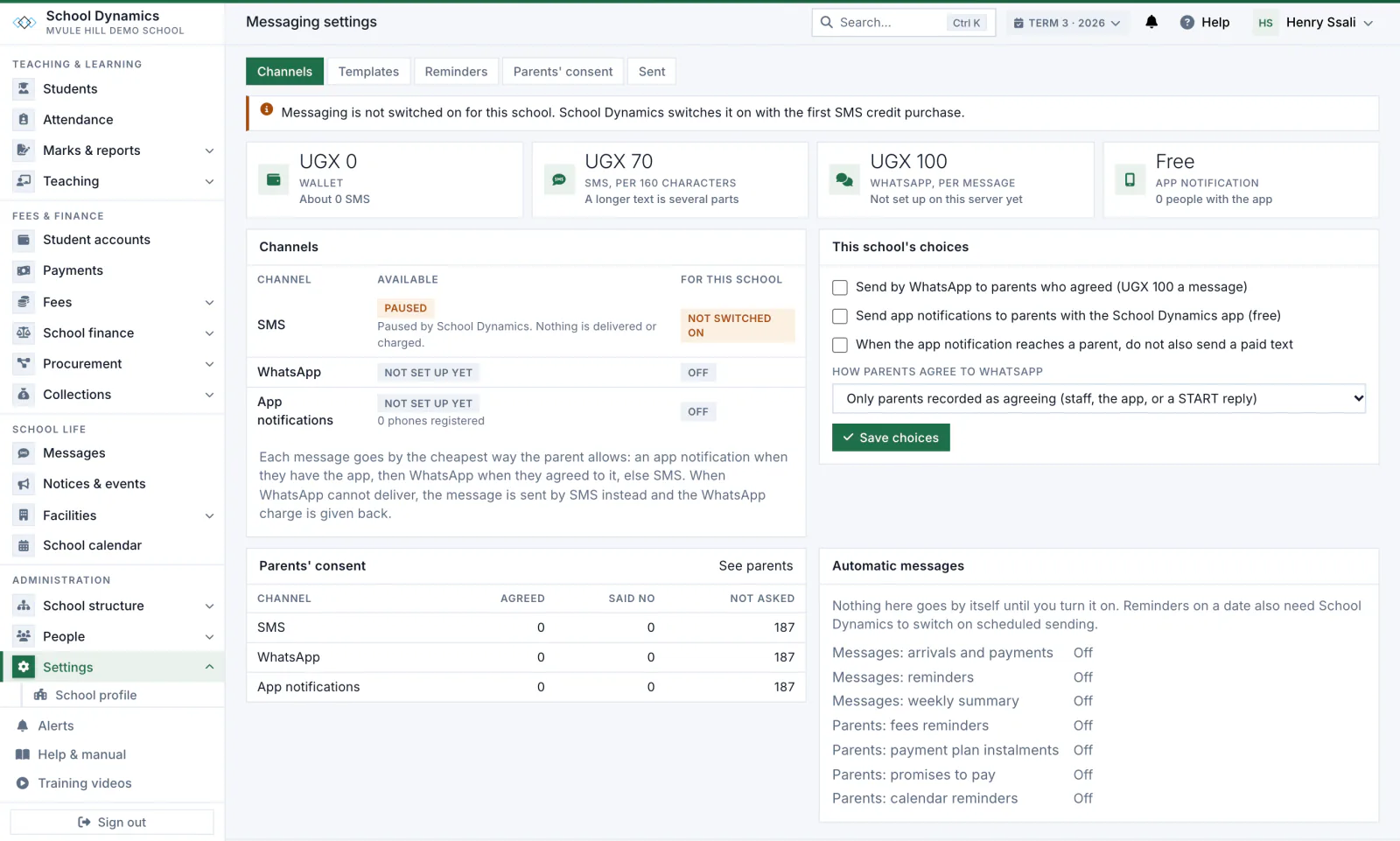
- The wallet: what is left for texts. Click it to see every movement.
- What an SMS costs: UGX 70 for each 160 characters.
- SMS: whether School Dynamics is delivering texts, and whether your school is switched on.
- Your school's choices for WhatsApp and app notifications.
- Automatic messages: nothing goes by itself until you turn it on.
- The wallet 1: what is left, and about how many texts that buys. Click it to open the wallet.
- The price 2: UGX 70 for each SMS part. WhatsApp and app notifications have their own figures beside it.
- The SMS row 3: Available says Paused when School Dynamics has paused texts. For this school says On, or Not switched on.
- This school's choices 4: which other ways your school uses (see below).
- Automatic messages 5: the jobs that send reminders by themselves, and when each last ran.
The wallet
Every school has one wallet for texts. SMS credit you buy goes in. Every SMS part that is sent comes out.
Open School life › Messages and the Wallet tab to see:
- Balance: what is left, and about how many texts that is.
- Spent this month.
- Messaging: On when your school can send texts.
- Every movement, newest first, with the Balance after it: each credit bought and each SMS part sent.
- Credit purchases: each one, whether it is paid, and whether it is In the wallet yet.
When the balance runs low, the page says so, with about how many texts are left. Nobody at the school can change the wallet by hand. It moves only when credit is bought or texts are sent.
Once your school can send texts, those who send messages also see the wallet in the top bar, with signal bars like a phone's: the fewer bars, the less is left. Click it to see what was spent this month, how long the balance lasts at this pace, and the last top-up; Open the wallet goes to the Wallet tab. When the wallet falls low, the alert The SMS wallet is low (or is empty) appears under Alerts. See Alerts.
Buy SMS credit
- Open Settings › Licence & billing (the Top up button on the Wallet tab goes there too).
- Under SMS credit, press Buy SMS credit.
- Type the amount, from UGX 5,000 to UGX 5,000,000. UGX 70 buys one SMS part.
- Press Order and pay to pay online. When online payment is not available, the button says Order and get the invoice: pay the invoice the usual way.
The credit goes into the wallet as soon as the payment is confirmed. Your school's first purchase also switches messaging on. Licence & billing is open to the school administrator, the head teacher, the deputy, the bursar and the finance officer. See Licence and billing.
What a text costs
| Way | Cost | Used when |
|---|---|---|
| SMS | UGX 70 for each part of up to 160 characters | Always, while your school may send |
| UGX 100 a message, any length | School Dynamics has set it up, your school switched it on, and the parent agreed | |
| App notification | Free | The parent has the School Dynamics app, and your school switched it on |
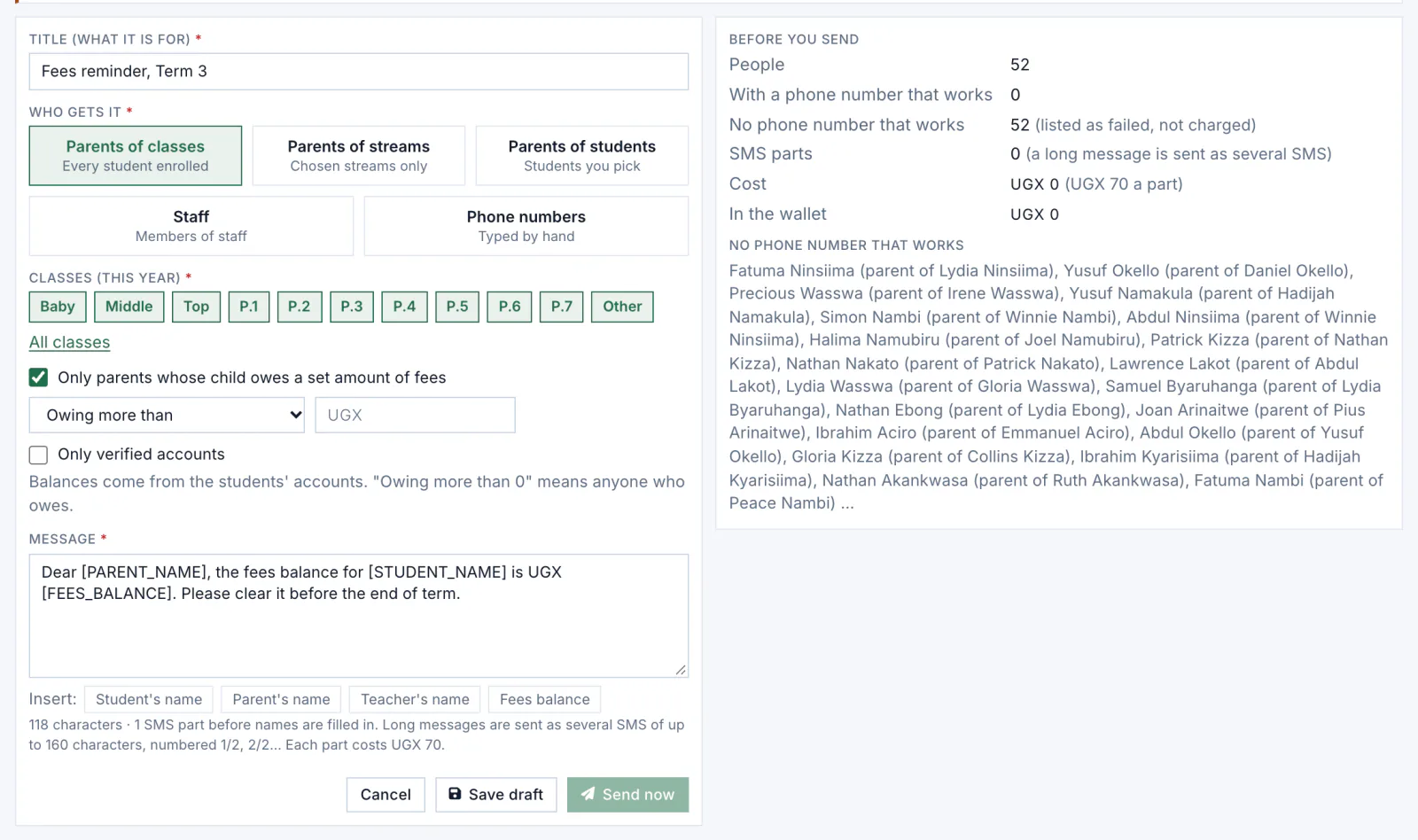
A message longer than 160 characters is cut into parts, numbered 1/2, 2/2 and so on. The numbers take a little room, so each part holds a few characters fewer. Before anything goes, the page shows the number of parts and the cost.
A part is charged only when the SMS company accepts it. Nothing is charged for a person with no valid phone number, for a parent who asked not to get SMS, or while School Dynamics has paused texts.
The whole cost is checked against the wallet first. If the wallet does not cover it, the message does not go, and you see a sentence like This message costs UGX 12,500 (250 SMS); the wallet has UGX 8,000. Top up the wallet first.
Which way a message goes
Messages you write yourself on the Messages page always go by SMS.
The school's ready-made messages (templates, reminders, and reminders about notices) go by the cheapest way each parent allows:
- an app notification, when the parent has the app (free);
- WhatsApp, when the parent agreed to it (UGX 100);
- otherwise SMS (UGX 70 a part).
When WhatsApp cannot deliver a message, it is sent by SMS instead and the WhatsApp charge goes back into the wallet.
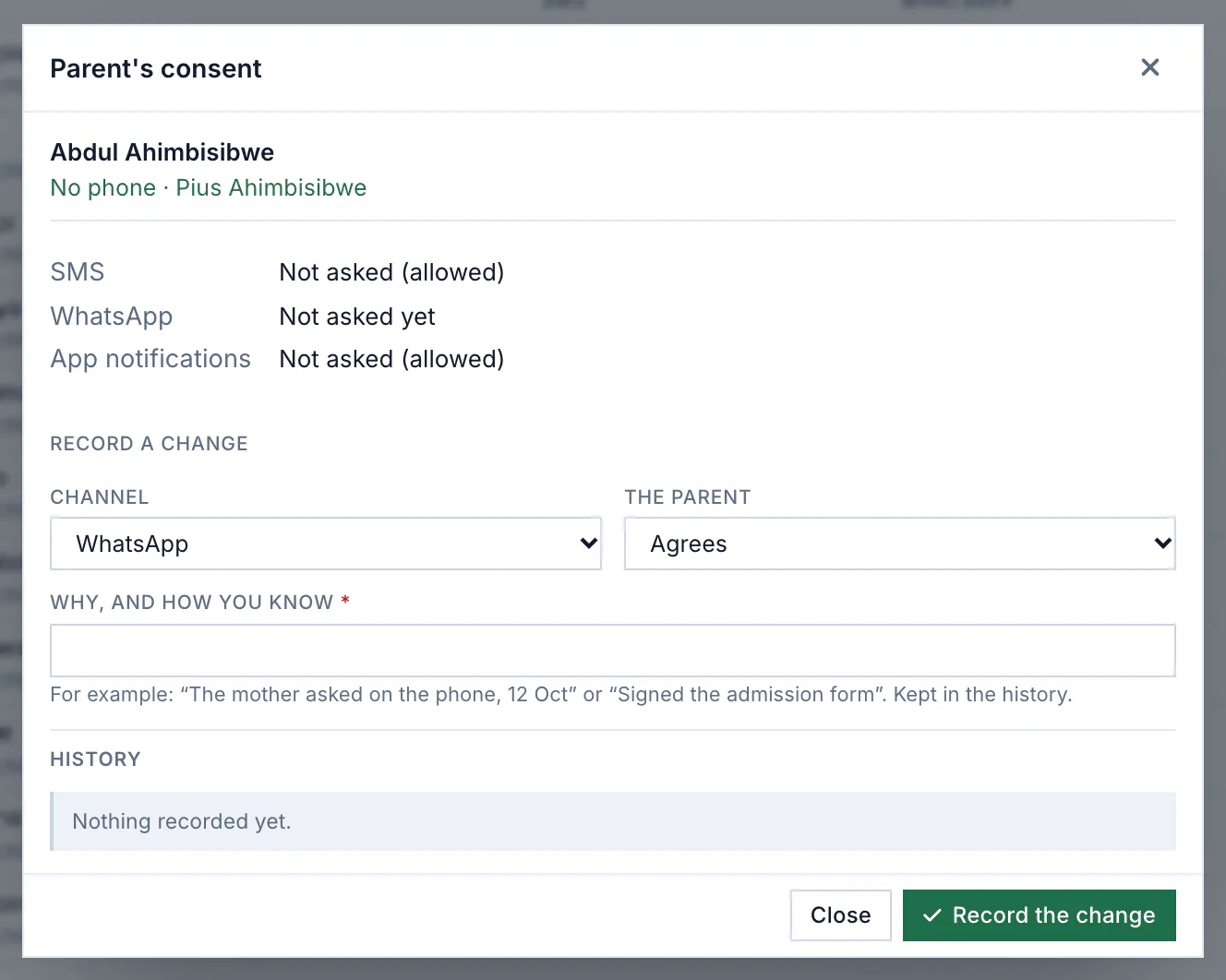
Choose the ways your school uses under This school's choices 4: tick Send by WhatsApp to parents who agreed, Send app notifications to parents with the School Dynamics app (free), or When the app notification reaches a parent, do not also send a paid text, then press Save choices. A way that you switched on but School Dynamics has not set up yet says On, waiting for School Dynamics.
The switches
All of these must be on before a text leaves the school:
- School Dynamics is delivering texts. School Dynamics can pause texts for every school at once. While they are paused, the messages pages say Text messages are paused by School Dynamics, so nothing is being delivered or charged. Messages sent then are recorded as not sent, with the reason Not sent: text messages are paused by School Dynamics. Nothing was charged. They do not go later by themselves: send them again once texts are back.
- Your school may send messages. This is switched on by itself when your school's first SMS credit payment is confirmed. Until then, the pages say Messaging is not switched on for this school yet, and Send now cannot be pressed (drafts can still be saved). After that, the school administrator or the owner can turn it off and on again: Settings › School profile, tab Messages, press Edit, then set Send messages to On or Off. With it off, no SMS leaves the school, whatever is in the wallet.
- The wallet covers the cost.
- For a ready-made message: that message is On. Each message template is switched on or off by itself. A message that is off is never sent, by hand or by itself.
Automatic messages start off
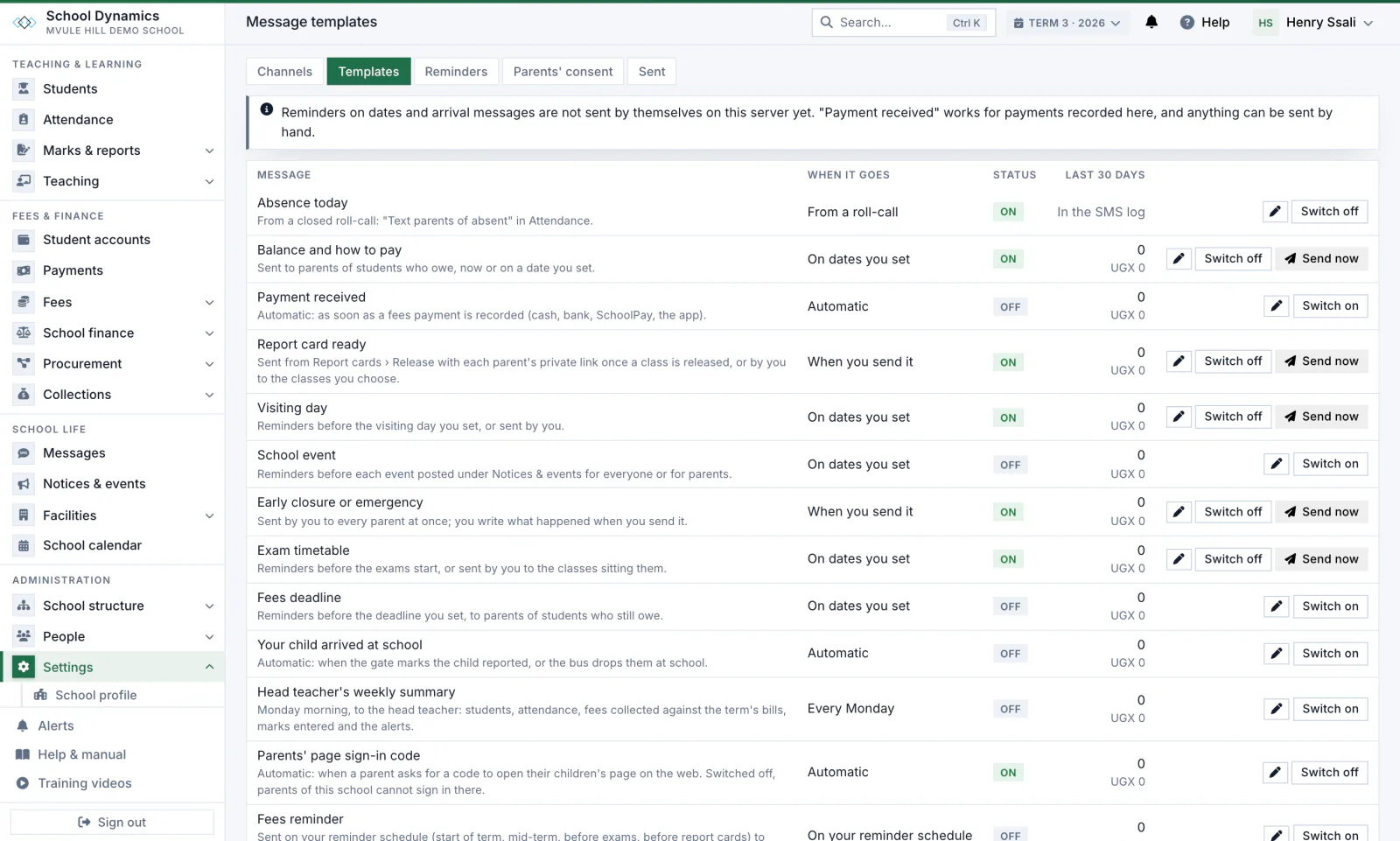
A message that goes by itself (when a payment is recorded, when a child arrives at school, on a reminder date) starts Off in every school. Nothing goes by itself until someone at your school switches it on.
The one exception is the code a parent asks for to open the parents' pages on the web. It starts On, because the parent is waiting for it as they ask. If you switch it off, your parents cannot sign in there. See Signing in with a parent code.
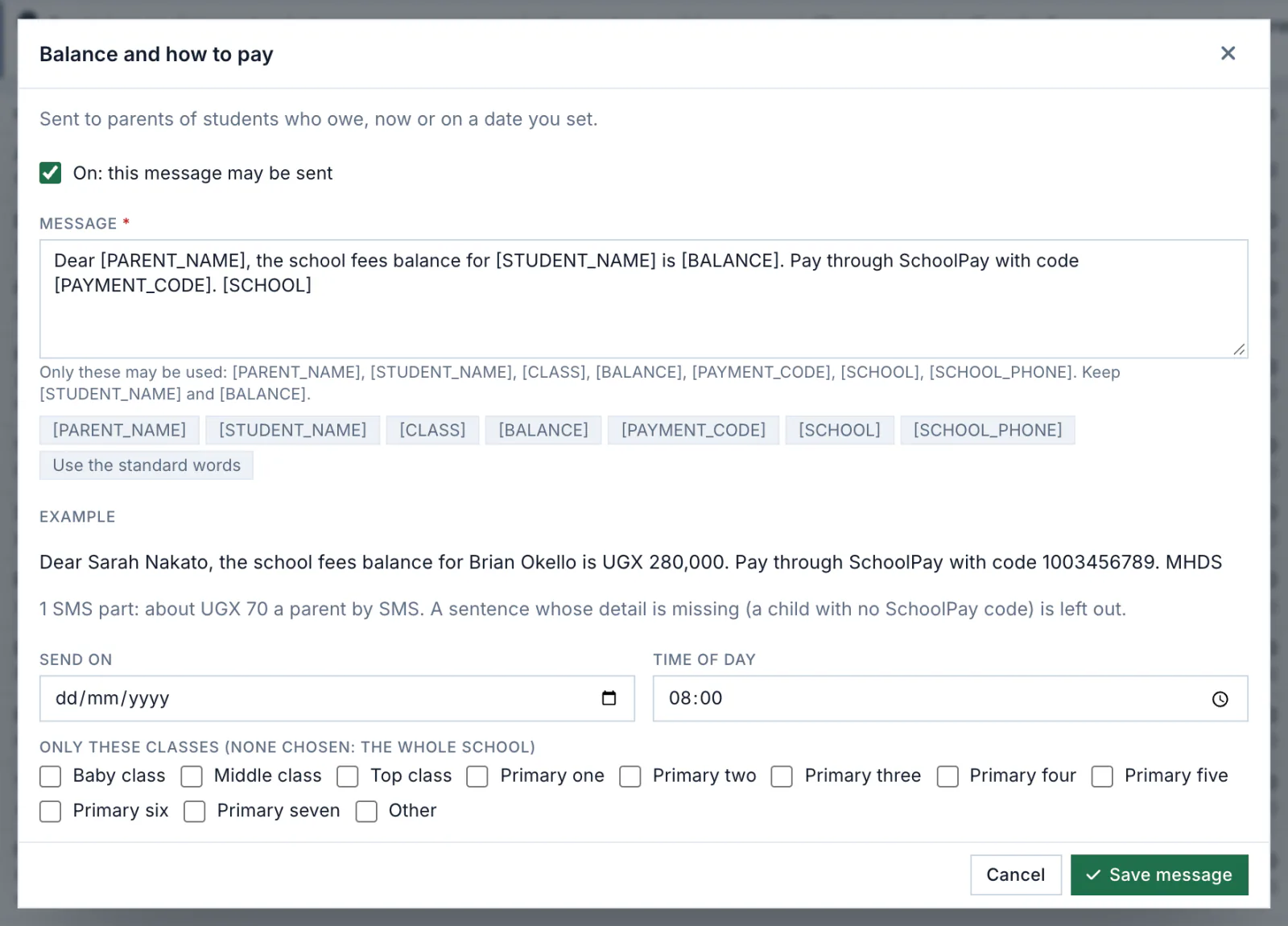
Messages that a person sends by hand, such as Report card ready or Early closure or emergency, start On. They still go only when someone presses Send now. Three of them (Balance and how to pay, Visiting day and Exam timetable) can also go by themselves on a date, but only after you type that date on the message.
Reminders on a date also need School Dynamics to switch on scheduled sending for your school. Until then, the Automatic messages box 5 says Nothing here goes by itself until you turn it on. Reminders on a date also need School Dynamics to switch on scheduled sending.
To switch messages on and change their words, see Automatic messages and templates.
Questions
- How much does one text cost?
UGX 70 for each SMS part of up to 160 characters. A longer message is cut into parts, and the page shows how many before anything is sent.
- We bought credit, but nothing can be sent. Why?
Open Settings › Message settings. Check that the wallet shows the credit (it arrives once the payment is confirmed), that the SMS row says On for your school, and that the page does not say texts are paused by School Dynamics.
- Is a text charged when it fails?
No. A part is charged only when the SMS company accepts it. Nothing is charged for a person with no valid number, for a parent who asked not to get SMS, or while School Dynamics has paused texts.
- Can someone at the school change the wallet balance?
No. The wallet moves only when credit is bought or texts are sent. Every movement is listed on the Wallet tab.